

 Home
HomeSome Canon digital still cameras (Powershot A75, A63, S410 etc.) are capable of shooting a limited amount of video, since there is no tape, it is saved as an MVI file format. While in this case, how to easily edit the MVI files in Pinnacle Studio has troubled a lot of people. With the incompatible format errors, we have got some solutions below. Let's take a close look.
In other words, Pinnacle Studio not only refuses the MVI files, but also for other formats like AVCHD MTS or MXF, etc. So which could be the best one for Pinnacle Studio? Absolutely right! After searching a lot of information, we found AVI could be the right one for Pinnacle Studio, do you think so? Thus, the work would easier, how to convert the MVI to AVI has become the key point.
Here we would like to recommend you the Pavtube Video Converter, which we could see as the best MVI to AVI converter that nicely work this conversion job well. Moreover, there are some other functional adjustment items for us to make some advanced settings for output videos. Need more details for learning?


How to make MVI to AVI for Pinnnacle Studio ?
Step 1.Download MVI to AVI Video Converter
Follow the prompts to install the program. Click "Add Video" or "Add from folder" icon to load MVI files or directly drag the files into file list. By default, the files are selected. If you would like to join all the selected files together, check the box of "Merge into one file". You could view the files in preview window, simply highlight the file and click play button.
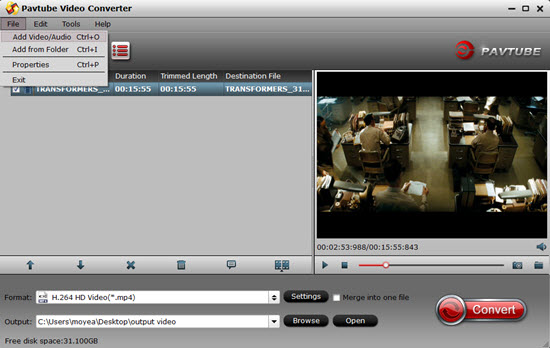
Step 2. Click "Format" bar to determine output format.
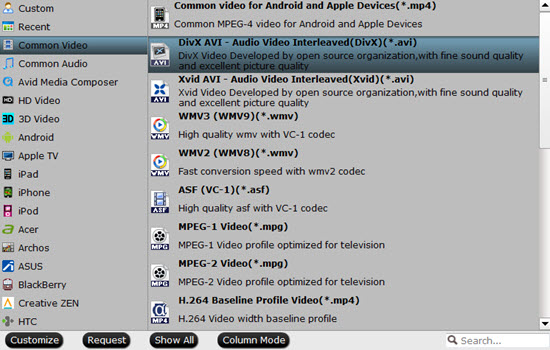
Follow "Common Video">"AVI Video (*.avi)/ DivX AVI(*.avi)". Click "Settings" if you'd like to customize advanced audio and video parameters like Video Codec, aspect ratio, bit rate, frame rate, Audio codec, sampling rate, bit rate, channels. Do not forget to click "OK" to confirm your settings. Then type in a desired output location in the "Output" box.
Step 3. Click "Convert" to start converting MVI files to AVI.
You could set auto shutdown in progress window or leave it there and come back later.
After conversion you could edit the converted video in Pinnacle Studio, and make a film out of it or burn it onto DVD.
To learn more conversion solutions for MVI/MOV files recorded by Canon PowerShot and EOS DSLR cameras, or Canon MXF clips captured by XF100, XF105, XF300, XF305, and Canon EOS C300, or AVCHD MTS files shot by VIXIA cameras, you are recommended to visit Pavtube's Canon Camera File Transcode page.
More reading:
Canon EOS Rebel T6s/760D MP4 to ProRes, AIC, DNxHD, MPEG-2, etc for Editing
AVCHD Tips - How to Play and Edit AVCHD (Lite) Videos?
How to Playback XAVC 4K Videos by MX Player on Philip TV?
 Free Trial Video Converter

Useful Tips
- How to Convert MPG to AVI Easily?
- Play AVI on Xbox One S from USB Drive or DLNA Server
- Windows Media Player Won't Play AVI Files, Solved!
- How to Get AVI Files Played on VLC Media Player?
- iMovie Not Import AVI or iMovie Plays AVI with No Sound Solved
- How to Import and Edit AVI Files with FCP X on Mac El Capitan/Sierra?




