

 Home
HomeI believe there are still many people like to watch movies with DVD players, though we have come into a HD period with Blu-ray videos. With a high price, Blu-ray video disc seems not worth buying for common movie lovers. So, many users want to know whether we can enjoy DVD movies on Amazon Kindle Fire.
There are many ways for us to transfer DVD files to Kindle Fire. For example, you can use a data cable connected to the PC to load DVD movies to Kindle Fire, or if you don’t have data cable at hand, you can launch your Bluetooth to review DVD movies on Kindle Fire. However, you will find it impossible to play DVD movies on Kindle Fire. The reason why we can not enjoy DVD movies with Kindle Fire is that DVD videos are not compatible with Kindle Fire.
How to make DVD movie compatible with Kindle Fire? You can try to convert DVD movies to Kindle Fire compatible formats for smoothly playing. I recommend Pavtube DVD Ripper. It is a great DVD to Kindle Fire Converter for you to get Kindle Fire compatible videos for playing back. With this DVD to MP4 converter, you can easily convert DVD to MP4 which is compatible with Amazon Kindle Fire.
What you should do to get ready for the conversion? Download Pavtube DVD to Kindle Fire Covnerter and launch it after the installation. Then, you only need some simple steps to rip DVD movies on Windons 7 to get MP4 movies for playing on Kindle Fire.
There are three ways to import DVD movie files to the program - from DVD ROM, DVD Folder, and DVD IFO/ISO image file. If you choose to import from DVD folder and DVD ISO file, please make sure the file system in DVD folder and ISO file are not broken, or the importing would fail. (Put DVD ISO files onto Kindle Fire)
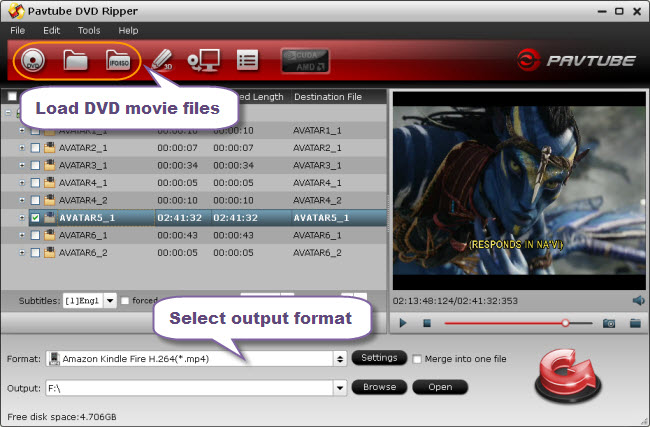
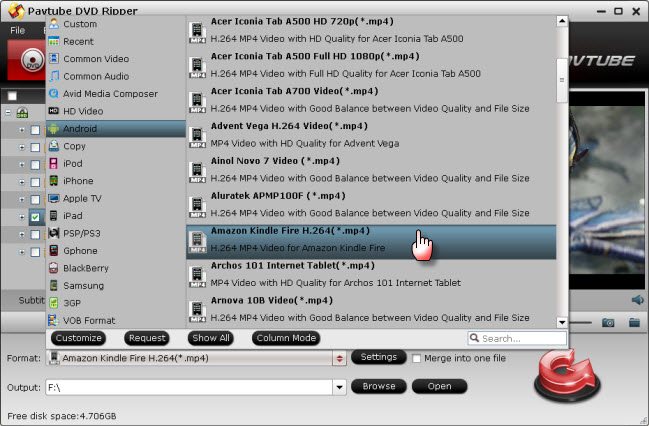
Set output format for DVD movies. Pavtube DVD Ripper for Kindle Fire comes with optimized format preset for Amazon Kindle Fire. To get excellent playback quality, you just need choose “Amazon Kindle Fire H.264 (*.mp4)” as target format under “Android” option from numerous format presets.
Now, you can enjoy DVD Movies on Kindle Fire at anytime, anywhere!
Pavtube Studio also developed Mac version of DVD to Kindle Fire Converter to help Mac OS X users bring DVD to Kindle Fire on Mac and Blu-ray Ripping software to assist people in watching Blu-ray DVD movies on Kindle Fire.
 Free Trial DVD Ripper

Useful Tips
- How can I Play Flash Video (FLV, F4V) on Kindle Fire HD?
- Connect Kindle Fire HD to Computer (Windows/Mac) for Files Transfer
- Enable Surface RT & Pro Tablet to Play MKV/AVI/MPG/TiVo/VOB Files Effortlessly
- How to Play VOB on Kindle Fire without any Hassle ?
- Enable Microsoft Surface RT/Pro Tablet to Play Flash FLV/F4V Videos
- Samsung Galaxy Tab AVI – put and play AVI on Galaxy Tab




