

 Home
Home
So you just have a Motorola Xoom tablet on hand? Wanna make full use of the 10.1-inch display with 1280*800 resolution to watch DVD movies? Haven’t found out an available way? No worry. The following guide will show you a detailed solution on how to rip/convert DVD movies to Xoom, and watch DVDs on Xoom by using Pavtube DVD to Xoom Converter. Just feel free to check the contents below to see if it is what you are looking for.
For your references: PLAYABLE FORMATS of Xoom
AAC, H.263, H.264, MP3, MPEG-4, ACC+ Enhanced, OGG, MIDI, AMR NB, AAC+
Step-by-step guide:
How to rip/convert DVD movies to Xoom, and watch DVDs on Xoom?
Step 1: Free download Pavtube DVD to Xoom Converter, install and launch it.
Once run the program, you can click “DVD Rom”, “DVD Folder”, and “IFO/ISO” icon to load your DVD movie files. All titles are checked by default soon after loading, you can right click on a title to “Uncheck All”, so as to tick off your wanted titles to convert. In general, the title with the longest duration time would always be the main movie. 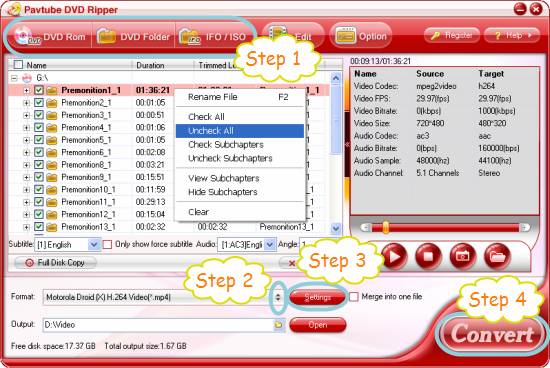
Step 2: Select output format for your Motorola Xoom tablet
In order to rip/convert DVD movies to Xoom, or watch DVDs on Xoom, you need click the dropdown list of “Format” to choose a file type compatible with the Xoom as target format. We recommend you to choose “Android> Motorola Droid (X) H.264 Video (*.mp4)” as output format for your tablet. 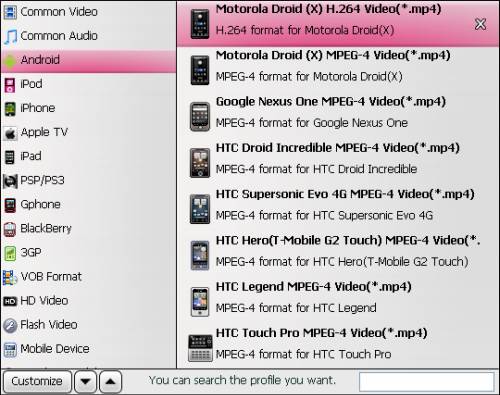
Step 3: Set optimum settings for Motorola Xoom
Click “Settings” button to set optimum settings for Motorola Xoom. All parameters on the following window are adjustable, including codec, size, bit rate, frame rate, sample rate and audio channel. Motorola Xoom is capable of playing back 720p video, so you can set video “Size(pix)” at 1280*720 to get a 720p playback quality. 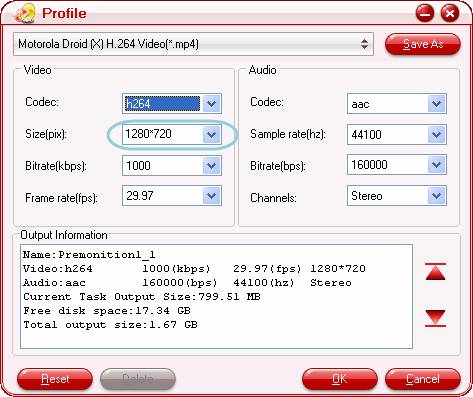
Step 4: Start ripping/converting DVD movies to Xoom
Click “Convert” button to start ripping/converting DVD movies to Xoom playable format. Once the conversion is done by the DVD to Xoom Converter, you can click “Open” button to get the converted files with ease. Now, you are ready to watch DVDs on Xoom.
Tips:
If you also have some commercial Blu-ray movies, you may wanna know how to Watch BD movies on Motorola Xoom.
If you are looking for the best Motorola Xoom Video Converter, you can see the guide on how to convert AVI, MTS, MKV to Motorola Xoom.
If you have a Motorola Droid X, you may want to see the optimal settings for Droid X.
 Free Trial DVD Ripper

Useful Tips
- How can I Play Flash Video (FLV, F4V) on Kindle Fire HD?
- Connect Kindle Fire HD to Computer (Windows/Mac) for Files Transfer
- Enable Surface RT & Pro Tablet to Play MKV/AVI/MPG/TiVo/VOB Files Effortlessly
- How to Play VOB on Kindle Fire without any Hassle ?
- Enable Microsoft Surface RT/Pro Tablet to Play Flash FLV/F4V Videos
- Samsung Galaxy Tab AVI – put and play AVI on Galaxy Tab




