

 Home
Home
Wanna down convert Blu-ray movie to Archos tablet? Wish to put DVDs onto archos 7? The Pavtube Blu-ray DVD to Archos 7 Converter provides users with optimal and adjustable output formats for Archos tablets. I managed to rip my DVD and Blu-ray movie collections for Archos 7 so that I can take the movies along when traveling. Want to know how did I customize (convert and shrink) DVD and Blu-ray movies to Archos videos? Well, you may find details in the step-by-step guide below. No matter you are using Archos 7, Archos 8, Archos 5, or the latest Archos 101 tab, there is a best fit for you.
Required Hardware: PC with Blu-ray Disc drive
Required Software: Pavtube Blu-ray Ripper (you may download a trial version of the Blu-ray to Archos 7 Converter and try it out)
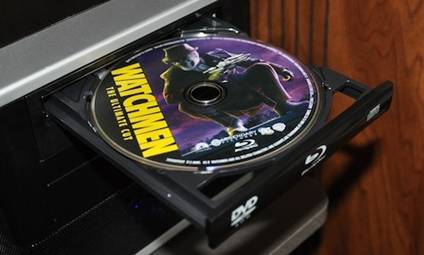
Step 1: Run Pavtube Blu-ray to Archos 7 Converter, and import source blu-ray/ DVD movies
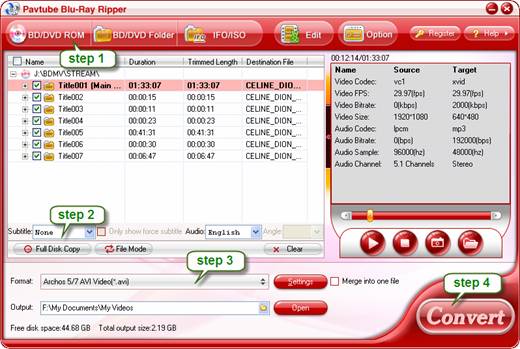
Click “BD/DVD ROM” to load your source Blu-ray or DVD movie. It usually takes a few seconds to load your Blu-ray movie from target BD drive. When all the movie clips are loaded to file list, check the main movie and leave the unwanted files unchecked. The main movie is distinguished by its length (duration). So check the longest Title. You could view it in preview window.
Step 2. Set audio track and subtitles for selected chapters.
You can select audio track and subtitle (if necessary) for Blu-ray and DVD movie clips. Click on the Audio box and select an audio track with desired language. Set subtitles in the same way. There is a box of “Force Subtitles” too. When you set English as subtitle and check the box of “Force Subtitles”, the subtitle appears only when languages other than English are spoken. For example, in the movie Avatar, if I select English subtitle and set Force Subtitles, the subtitle appears only when the Navi language is spoken.
Step 3. Choose output format for watching Blu-ray and DVD movies on Archos 7
Simply click on the drop-down list of “Format”, and choose an appropriate format for Blu-ray/DVD to Archos 7 conversion. Pavtube Blu-ray Ripper provides presets for Archos 5, Archos 7, Archos 605, Archos 705, Archos 704, Archos 504, Archos 604, etc, so you may select a preset format in “Archos” tab. The “Archos 5/7 AVI Video (*.avi)” is recommended for converting 720*480 DVD that has no black bars. If there are black bars on top and bottom, crop the black boarders out in Editor.
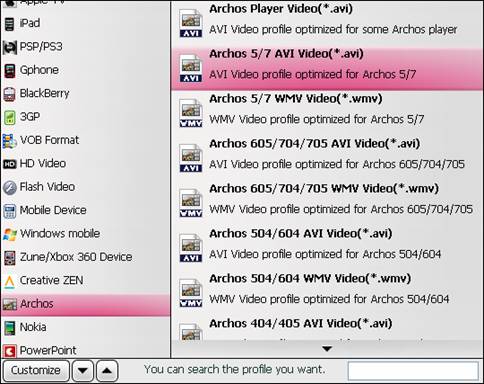
There’s a tips for Blu-ray to Archos 7 conversion. To maintain full screen display on Archos 7, you need set a 16:9 video size. Click on "Settings" button and find video “Size” in Settings window, select “custom” from dropdown list, and input 800*480.
Step 4: Rip Blu-ray and DVD movies to Archos 7 videos
Click the big button “Convert” to start converting video to Archos 7 compatible video format via using Pavtube Blu-ray to Archos 7 Converter. Once the conversion task is done, you can click “Open” button to get the resulted files for your Archos 7 (or Archos 5, Archos 8, Archos 101) at ease.
Finally, copy your DVD/ Blu-ray movies from your computer to your Archos 7 and then you can watch movies on Archos 7 freely. Or you may access the video from hard PC drive via UPnP as well. If you’d also put videos of various formats to Archos 7, please also refer to How to watch videos, music, DVDs and blu-ray movies on Archos 7?
 Free Trial Blu-ray Ripper

Useful Tips
- How can I Play Flash Video (FLV, F4V) on Kindle Fire HD?
- Connect Kindle Fire HD to Computer (Windows/Mac) for Files Transfer
- Enable Surface RT & Pro Tablet to Play MKV/AVI/MPG/TiVo/VOB Files Effortlessly
- How to Play VOB on Kindle Fire without any Hassle ?
- Enable Microsoft Surface RT/Pro Tablet to Play Flash FLV/F4V Videos
- Samsung Galaxy Tab AVI – put and play AVI on Galaxy Tab




