

 Home
HomeWith widespread use of DLNA, many home entertainment equipments have take advantage of it and released more and more DLNA certified products to attract customers. Samsung is one of them and nearly all of its products support DLNA with allshare which is a DMS for searching and connecting DLNA certified devices to share and play media files with each other.
The appearance of DLNA has changed the way we play Blu-ray movies on Galaxy Tab. Before then, we find it difficult to enjoy Blu-ray movies with Galaxy Tab, even though we succeeded in loading BD movies to Galaxy Tab. And now, we can rip Blu-ray movies for Galaxy Tab playing without any transporting.
Is it true that we are allowed stream Blu-ray movies to Galaxy Tab for smoothly playing while the Blu-ray movies are restored on PC hard drive? In fact, allshare and DLNA allows sharing among all the DLNA certified devices once connected to the wireless line. But, DLNA has its own support video formats, that is to say, Blu-ray movies are not supported directly streaming and playing through DLNA.
The best way to play Blu-ray movies on Galaxy Tab with allshare is to make Blu-ray movies compatible with allshare. Here I recommend Pavtube Blu-ray Ripper as the great Blu-ray to Galaxy Tab converter for you to rip Blu-ray movies to DLNA compatible format like MP4. Below are quick steps for ripping BD movies for Galaxy Tab playing with allshare.
Step 1: Free download, install and launch this Blu-ray to Galaxy Tab ripper.
Once you run the program, click "BD/DVD Folder" or "IFO File" to load your BD or DVD files.
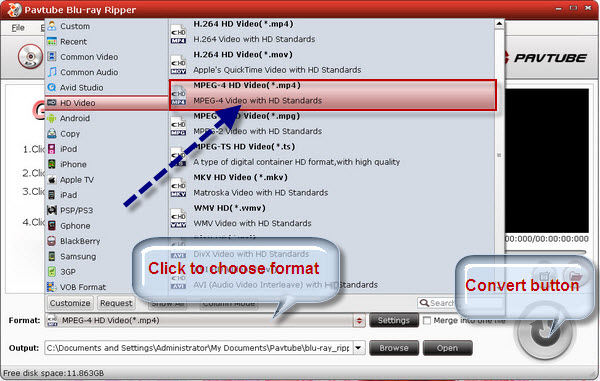
Step 2: Select MPEG-4 HD Video (*.mp4) as output format for Galaxy Tab.
Click the format bar and the format list will appear. Follow "HD Video" > "MPEG-4 HD Video (*.mp4)" to choose MP4 format as the output format.
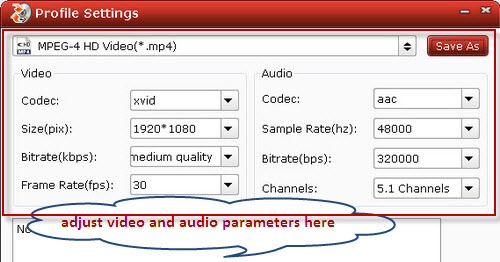
Step 3: Click "Settings" button to adjust video and audio parameters.
Notice that which parameter to select has close relationship with the hardware configurations of your computer, so before your adjustment, read the following info attentively.
Step 4: Click "Convert" button to start Blu-ray ripping for Galaxy Tab.
Once the ripping task is completed, you can click "Open" button to get the output MP4 videos on your PC. And with allshare, you can enjoy the converted movies on Galaxy Tab with ease.
 Free Trial Blu-ray Ripper

Useful Tips
- How can I Play Flash Video (FLV, F4V) on Kindle Fire HD?
- Connect Kindle Fire HD to Computer (Windows/Mac) for Files Transfer
- Enable Surface RT & Pro Tablet to Play MKV/AVI/MPG/TiVo/VOB Files Effortlessly
- How to Play VOB on Kindle Fire without any Hassle ?
- Enable Microsoft Surface RT/Pro Tablet to Play Flash FLV/F4V Videos
- Samsung Galaxy Tab AVI – put and play AVI on Galaxy Tab




