

 Home
HomeAre you interested in watching HD movies? And how do you prefer enjoying HD movies, enjoying in the cinema, or just playing Blu-ray movies on your HD media player? Both are so popular in nowadays, and each of them has its advantages and disadvantages. Which way you would like to enjoy movies depends on specific circumstance. MKV is a usual video format that always comes from Blu-ray movies. Now, how to convert MKV for Kindle Fire playing?
As we know that MKV videos are not able to be played on Kindle Fire directly. Maybe you need a Windows MKV to Kindle Fire converter to help you get Kindle Fire compatible videos. Here I will recommend Pavtube HD Video Converter for you to convert MKV to MP4 on Windows so that you can transfer MP4 videos to Kindle Fire for playing. Pavtube HD Video Converter is a MKV editor on Windows 7 as well, and you can do some editing with MKV videos with trimming, cropping or replacing audio.
Follow below steps, you will find it easy to convert and load MKV videos to Kindle Fire Tab.
The first thing you must do is to download the trial version of Pavtube HD Video Converter, and install this great MKV to Kindle Fire converter to your PC. The trial version has limitations such as there will be a watermark on the converted videos, if you don’t mind it, it’s OK. But if you want to get rid of watermark, please go to the purchase page and finish the paying, then you will get the full version and lifetime free upgrades.
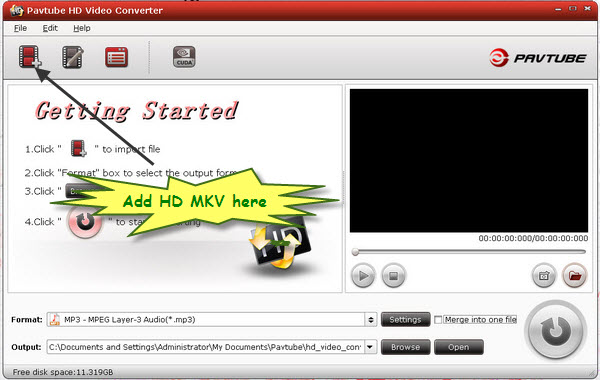
After the installation, you can click the add button to import MKV videos to the program. And then, you need choose the output format for your MKV videos. Please click the format bar and choose H.264 HD Video (*.MP4). Also, if you have several videos, the program offers you merging MKV videos for Kindle Fire.
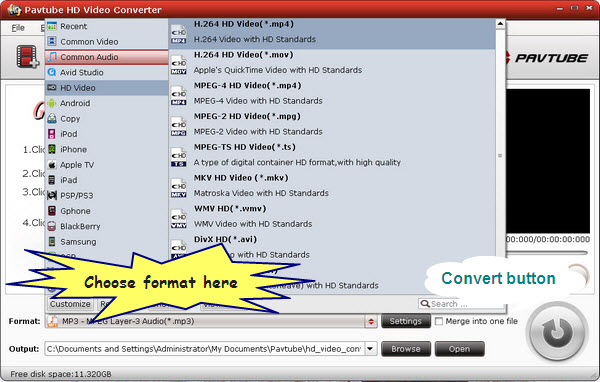
Then the settings have been finished, you can freely click the convert button and transcode MKV movies for playing on Kindle Fire. After the conversion, you will get the converted videos with high video and audio quality. Then you can play MKV with Kindle Fire Tab.
 Free Trial HD Video Converter

Useful Tips
- How can I Play Flash Video (FLV, F4V) on Kindle Fire HD?
- Connect Kindle Fire HD to Computer (Windows/Mac) for Files Transfer
- Enable Surface RT & Pro Tablet to Play MKV/AVI/MPG/TiVo/VOB Files Effortlessly
- How to Play VOB on Kindle Fire without any Hassle ?
- Enable Microsoft Surface RT/Pro Tablet to Play Flash FLV/F4V Videos
- Samsung Galaxy Tab AVI – put and play AVI on Galaxy Tab




