

 Home
HomeIt seems that many Canon XF 300/305 camcorder users, especially beginners and amateurs, are trapped by the MXF format that the Canon XF series use. So, it's urgent to solve the problem of converting Canon XF305 MXF footage to VOB format for playing on TV.
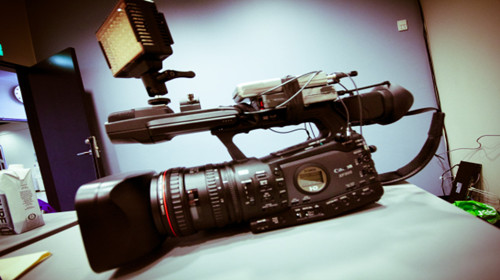
"I'm using Canon XF305 camera and the output is MXF, now I want to convert MXF to VOB so that I can play it on Television through my DVD player. Then in that case what is the right format to be chosen?" The question was put up by one of my friend the other day.
Comparing with MXF, most people prefer to edit a more robust format such as ProRes and MPEG-2, or play a more prevalent format such as AVI or MP4. If you'd like to watch the Canon MXF footage on TV, it is advised that you convert MXF to VOB or other format that your DVD player supports.
The following guide shows how to convert MXF to VOB with Pavtube HD Video Converter, which is capable of converting MXF to VOB, MPG, ProRes 422, AVI, MP4, MKV, TS and many other popular video and audio formats.
Hot search: MXF to iMovie, MXF to FCP, MXF to Avid


How to convert Canon XF305 MXF footage to VOB format
Step 1. Load Canon XF305 MXF videos to this MXF TO VOB Converter. Transfer MXF folders from Canon XF305 camcorder to computer via USB cable. Run MXF to VOB Video Converter, and click the "Add" button to browse to Canon XF305 MXF footage for conversion.
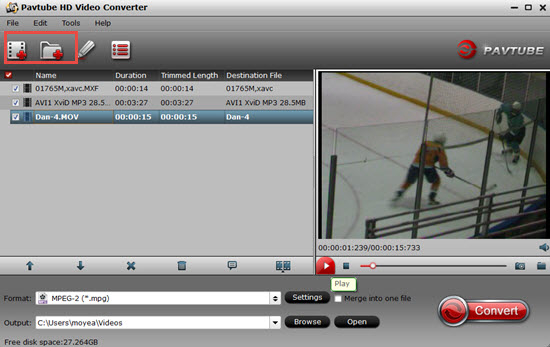
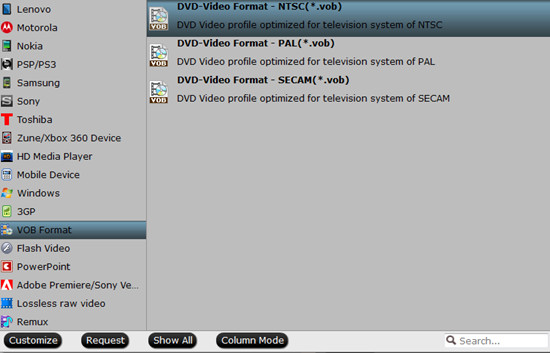
Step 2. Click "Format" bar to determine output format.
Select "VOB Format" from the list and find in submenu VOB formats for NTSC and PAL TV system.
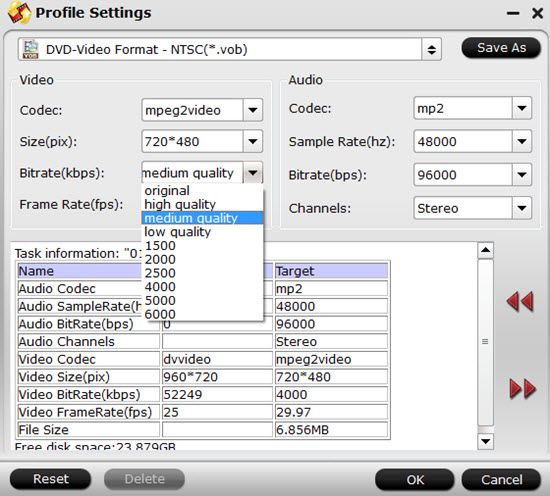
Step 3. In order to set advanced audio and video parameter
Click "Settings" to set video size, frame rate, aspect ratio, audio channel etc. E.g. set smaller bitrate to further cut down export file size. You may skip this step as well.
Step 4. Click "Browse" button to set a location on your HDD for the output video file.
Make sure there is enough disk space for saving generated files.
Step 5. Click "Convert" to start converting Canon XF305 MXF footage to VOB format
This MXF to VOB Video Converter is faster than most other video converter tools. After conversion just click the "Open" button to locate converted VOB files for playback.
Additional editing features of the Pavtube HD Video Converter:
1. Trim a section of the MXF clip - click "Editor", switch to "Trim" tab, and input time point in start and end box.
2. Combine Canon XF305 MXF footage together - check the files to be merged in file list and check "Merge into one" box beside "Settings" button.
3. If you want to update Canon XF305 MXF to Myspace, Flikr, YouTube, etc, just choose "Flash Video">"FLV" instead.
4. You can also refer to MXF to Mac application column to find more solutions for your MXF cameras. You will know the way to convert Canon MXF to ProRes 422, convert MXF to iMovie AIC, etc.
Further Reading:
Repack Canon XA25 AVCHD to AIC MOV
Put TiVo to NAS Device for Playing through Roku or WD TV
MKV to iPad 2 Converter- Convert 1080p MKV to 720p MP4 for iPad 2
 Free Trial HD Video Converter

Useful Tips
- How to Convert MXF to ProRes, AIC MOV for Loading into FCP and iMovie?
- Transfer Canon C300 MXF to FCP/Quicktime for editing on Mac
- Canon MXF file to iMovie importing issues on Mac
- How to Transcode MXF to AVI Easily and without Quality Drop ?
- Convert Panasonic P2 footage for importing to Davinci Resolve
- Fail to Import MXF Files into Premiere Pro CC 2015, Solved!




