

 Home
Home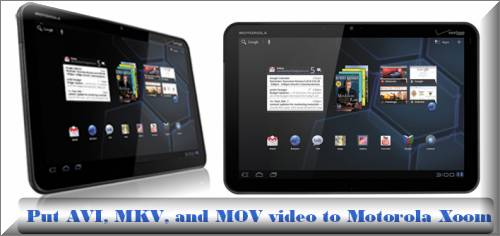
Motorola’s Xoom tablet, the iPad’s first real rival, comes with a 1GHz dual-core processor, a 10.1-inch display, and Android 3.0 Honeycomb operating system. With a 1280 by 800 pixel resolution, the 10.1-inch display is very nice, clear, and bright, which gives users impressive visual quality while watching videos on Xoom tablet. To enjoy videos on Xoom, you need ensure your videos are compatible with your tablet. According to the tech specs stated on the official site of Motorola, Xoom is workable with “AAC, H.263, H.264, MP3, MPEG-4, ACC+ Enhanced, OGG, MIDI, AMR NB, and AAC+” formats, if your video is out of this range, you need do format conversion in advance. The following guide shows how to put AVI, MKV, and MOV video to Motorola Xoom on Mac in detailed steps, just feel free to check it.
Required software:
Pavtube Motorola Xoom Video Converter for Mac
How to put AVI, MKV, and MOV video to Motorola Xoom on Mac?
Step 1: Run the Mac Motorola Xoom Video Converter, and then click “Add” button to load video files. Pavtube Motorola Xoom Video Converter for Mac allows users converting multiple files at a time, so you can load multiple files into the program to do batch conversion. In addition, if you wanna combine all the files into a single file, you can tick off the checkbox “Merge into one file” to realize your goal.
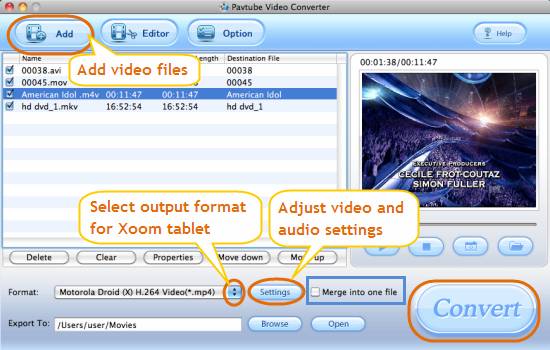
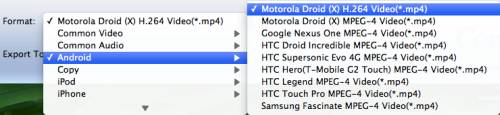
Step 2: In order to put AVI, MKV, and MOV video to Motorola Xoom on Mac, you need click the dropdown menu of “Format” to select a format compatible with Motorola Xoom as output format. We recommend you to follow “Android > Motorola Droid (X) H.264 Video (*.mp4)”.
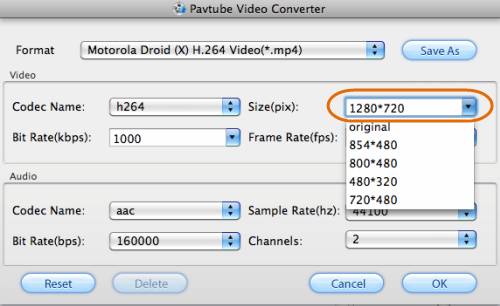
Step 3: Click “Settings” button to adjust video and audio parameters. The adjustable settings include codec name, bit rate, size, frame rate, and audio channel. Since the Motorola Xoom supports 720p video playback, you can change the “Size (pix)” to “1280*720” to get a well playback quality for your Xoom tablet.
Step 4: Click “Convert” button to start converting AVI, MKV, and MOV video to Motorola Xoom playable format on Mac. The Mac Motorola Xoom Video Converter is able to finish conversion at super high speed without causing you any audio and video out of sync issues. When the conversion is done, you can click “Open” button to get the final output filesyou're your Motorola Xoom tablet with ease.
Tips:
More than helping users watch videos on Xoom, the Mac video converter is also able to help you convert video files for your iPad, Dell Streak, iPhone 4, Xobx360, Popcorn Hour, PS3, Media Server, NAS, Archos, Apple TV, Droid X, Droid 2, Nokia N8, Motorola Atrix 4G, Galaxy Tab, HTC Evo 4G, iTunes, QuickTime Player, iMovie, FCE, Final Cut Pro, iDVD, and more.
 Free Trial Video Converter for Mac

Useful Tips
- How to Convert MPG to AVI Easily?
- Play AVI on Xbox One S from USB Drive or DLNA Server
- Windows Media Player Won't Play AVI Files, Solved!
- How to Get AVI Files Played on VLC Media Player?
- iMovie Not Import AVI or iMovie Plays AVI with No Sound Solved
- How to Import and Edit AVI Files with FCP X on Mac El Capitan/Sierra?




