

 Home
HomeThe Olympus E-PL3 (dubbed Olympus PEN Lite) is a brand new 12 megapixel compact system camera. WIth a stylish metal body, the EPL3 features the world’s fastest auto-focus system, a high resolution and tiltable 3 inch LCD screen, 5fps burst shooting, sensor-shift image stabilization, a hot shoe and an accessory port. Improvements to the sensitivity and read-out speed of the existing sensor makes ISO 12,800 shooting and Full HD movie recording possible. The E-PL3 can shoot up to 29 minutes of 1080 60i HD video and stereo sound in either AVCHD or AVI formats. A Direct HD Movie Button switches you from still to movie mode with just the press of a button.
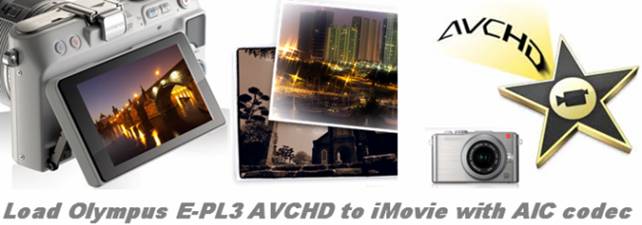
It is easy to shoot HD movies with the E-PL3 camera, whereas editing its footage in AVCHD format is not as easy as you expected. If you are trying to import some .mts clips taken with E-PL3 to iMovie for further editing, you may encounter issues that iMovie does not accept them natively. If that’s the case, you need to convert Olympus E-PL3 AVCHD video to AIC MOV so that you can import your recordings into iMovie successfully even without rendering. The following guide presents the detailed steps to do this.
Required Software
Pavtube MTS Converter for Mac - we will run it as an Olympus E-PL3 to iMovie Converter in this article.
 Transcode Olympus E-PL3 MTS to AIC for iMovie
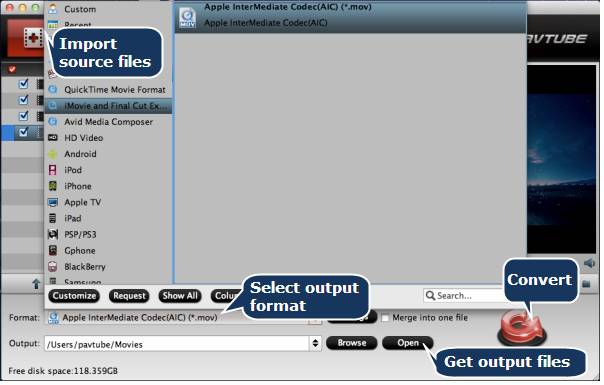
1. Launch Pavtube MTS Converter as E-PL3 AVCHD to AIC Converter for iMovie. Click “Add video” button or “Add from folder” icon to load your MTS source materials captured by Olympus E-PL3.
2. Click format menu to choose “Apple InterMediate Codec (AIC) (*.mov)” as output format from “iMovie and Final Cut Express” profile option.
3. Start E-PL3 AVCHD to iMovie conversion by clicking the “Convert” button in the bottom right corner.
4. When the conversion finished, click “Open” button to get the generated AIC MOV files for editing use with iMovie.
 Import converted E-PL3 AVCHD MTS files to iMovie
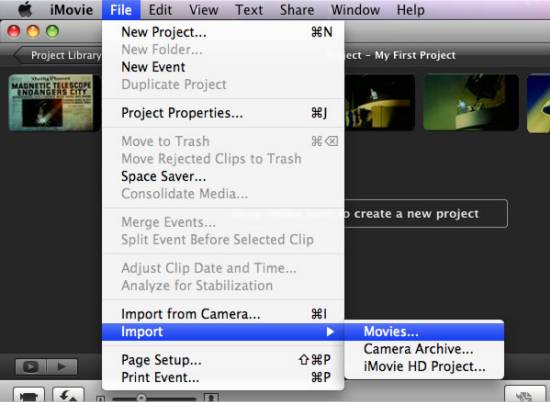
Open up iMovie, and follow File > Import > Movies… to load the converted Olympus E-PL3 AVCHD to iMovie with AIC Codec.
 Free Trial MTS/M2TS Converter for Mac

Useful Tips
- Import/Edit/Transcode Sony NEX-5N/NEX-7/A57/A65/A77 1080 50/60P AVCHD to iMovie on Mac
- Transcode TiVo Shows to AIC for Editing in iMovie and FCE
- Import Canon Rebel T4i (EOS 650D) MOV to iMovie for Editing – H.264 MOV to AIC Conversion
- Best Way to Import Nikon H.264 MOV to iMovie for Editing and Playing
- How to Convert QuickTime File to iMovie?
- Convert Sony AVCHD MTS/M2TS to AIC MOV for iMovie




