

 Home
HomeFeel like taking iTunes library movies on the road with Nook Tablet? Remove the DRM copy-protections first then, because all the purchased iTunes movies and TV shows are protected and restricted to be playback on iOS devices only. That means you can't transfer the M4V videos to non-Apple devices. If you want to play the videos on other players like Nook Tablet or Kindle Fire, you have to remove iTunes DRM from M4V and convert iTunes M4V to other video formats like MP4, MOV, AVI, etc. One highly-recommended iTunes M4V converter for Mac OS is Pavtube ChewTune, which integrate DRM-cracking and video converting and features specially designed template for Nook Tablet. The following guide shows you how to convert iTunes DRM purchases to Nook Tablet playable free videos.
Trial Download- Pavtube ChewTune for Mac
To use ChewTune for Mac, it is required that iTunes latest version be installed and correctly configured, which means you’ll need to
1. Set iTunes not to remember playback position.
2. Set iTunes to 32bit when/if you use ChewTune on Mac OS X Lion
Step-by-Step guide: convert iTunes protected movies to Nook Tablet playable free videos
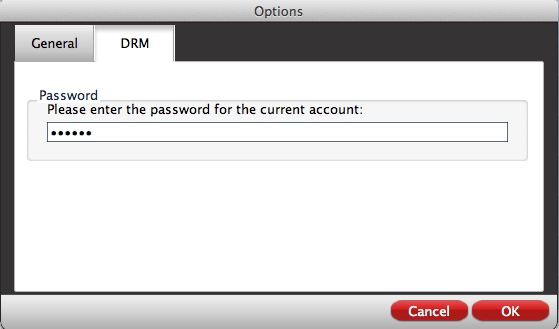
Step 1. Run Pavtube ChewTune on Mac/Mac Book/Mac BookPro, iMac, and put in password for user account as it requires.
2. Press the “Add” icon to browse to iTunes library movie folder. In Finder window, open Music-> iTunes-> iTunes Media-> specific movie folder-> single .m4v file, and then press on “Choose”.
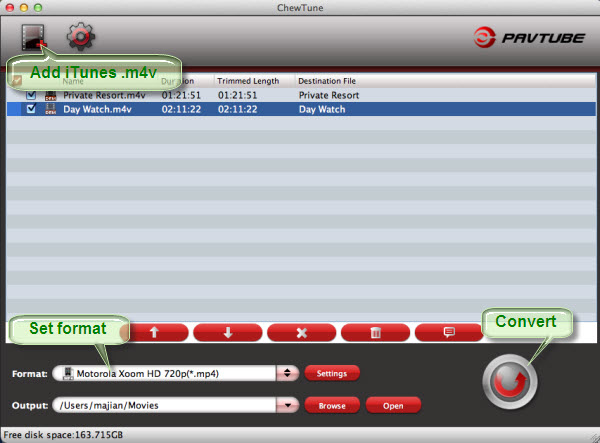
3. Click on the “Format” bar to choose a format for iTunes video conversion. Follow “Android” group to choose customized format for Nook Tablet.
5. After everything’s set down, click the big “Convert” to start converting iTunes M4V media to Nook Tablet friendly videos. iTunes pops up automatically when conversion starts. Leave it be and don’t close iTunes till conversion completes. After conversion you can click “Open” to find the DRM-free movies and transfer your iTunes purchases to Nook Tablet for playback whenever you like.
If you're worried about making sure ChewTune has the proper format for your other mobile devices, no need to sweat it because ChewTune has all kinds of format possibilities to choose from. There are customized formats for iPad, iPhone, Apple TV, Samsung Galaxy Tab, Motorola Xoom, BalckBerry PlayBook, Acer Iconia Tabs, ASUS Eee Pad Transformer, Kindle Fire, Samsung Galaxy S phones, Motorola Droids, HTC 4G phones, PSP, PS3, Xbox, etc. Pick up ChewTune for Mac for $29 only to get rid of the forced Pavtube watermark with trial version.
 Free Trial ChewTune for Mac

Useful Tips
- How can I Play Flash Video (FLV, F4V) on Kindle Fire HD?
- Connect Kindle Fire HD to Computer (Windows/Mac) for Files Transfer
- Enable Surface RT & Pro Tablet to Play MKV/AVI/MPG/TiVo/VOB Files Effortlessly
- How to Play VOB on Kindle Fire without any Hassle ?
- Enable Microsoft Surface RT/Pro Tablet to Play Flash FLV/F4V Videos
- Samsung Galaxy Tab AVI – put and play AVI on Galaxy Tab




