

 Home
HomeThe thing about movies and TV shows videos from iTunes is, that they're all DRM-protected. DRM copy protection is great as an anti-piracy technology, but it often punishes consumers that have legally purchased media. For regular Mac users, DRM could be a dirty trick constraining us to everything Apple: iPad, iPhone, iPod Touch, ATV. Only because I purchase movies from Mac iTunes store doesn’t mean I’ll also pick up an iPad or replace my newly-bought Galaxy II smartphone with an iPhone 4! Why should I be not allowed to take legally purchased iTunes M4V videos on the road with an Android phone or a HP TouchPad? That thought bring me to the Pavtube ChewTune for Mac, a nice and intuitive app that turns iTunes M4V movies and TV shows into FREE MP4 videos! Here’s how I did to get iTunes M4V purchases into DRM-free .mp4 files:
1. Follow Apple Support to set my iTunes to 32bit on my Mac OS X Lion system so as to ensure older M4V media files be converted all right. The ChewTune app also requires you to set iTunes not to remember playback position.
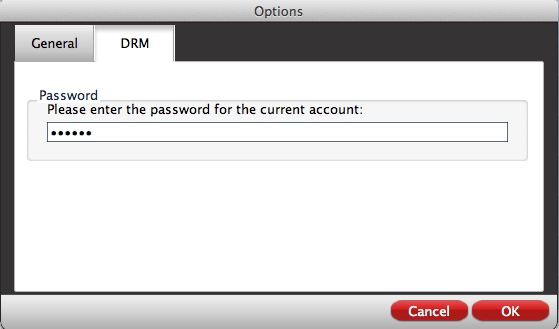
2. Run Pavtube ChewTune on Mac Lion, and put in password for user account as it requires.
3. Press the “Add” icon to browse to iTunes library movie folder. In Finder window, open Music-> iTunes-> iTunes Media-> specific movie folder-> single .m4v file, and then press on “Choose”.
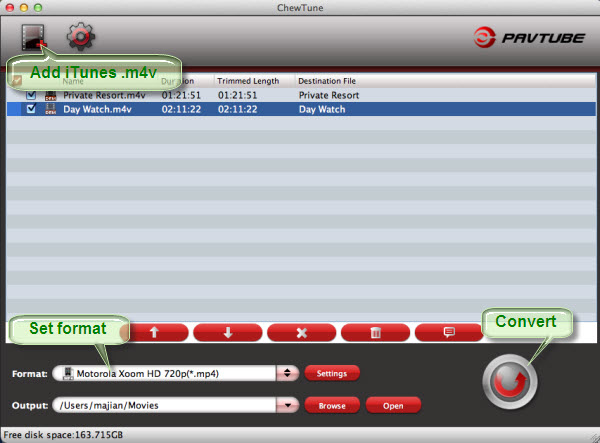
4. Set .mp4 format from the drop-down list of “Format” boarder. I followed “Android” group and choose the default Samsung Galaxy S format for my S II.
5. Press the big “Convert” to start converting iTunes M4V media to DRM-free MP4 videos. The conversion took quite a while, a little slower than I was expecting, but the final output was stellar, almost as good as the original iTunes M4V movie. And BTW, iTunes pops up automatically when conversion starts. Leave it be and don’t close iTunes till conversion completes.
A good thing with ChewTune for Mac is, there’re plenty of formats and presets for specific devices, from Android and PSP/PS3 to Blackberry and Windows Mobile, your specific format need is just a click away, no bother to Google which format to use. Processing speed is somewhat slow, but not unreasonable when it lets you queue up multiple tasks for overnight run and set auto shut down. So, when you decide to move from iPhone/iPod to Android, Pavtube ChewTune for Mac is the program to use.
 Free Trial ChewTune for Mac





