

 Home
HomeWith the development of Android OS, more and more Android applications are released for various devices which ship the Android OS. Among them, the smart phone and tablet PC win the majority of digital product market. Android devices usually support play videos with the touch screen. So, would the Android devices play Blu-ray movies? It is obvious that the Android devices can not play Blu-ray movies unless they are equipped with build-in BD ROM. Now, how to play Blu-ray movie on Android device?
Pavtube Blu-ray to Android ripper on Mac combines Blu-ray Ripper for Mac with DVD Ripper for Mac, with which you can rip Blu-ray movies to Android device on Mac in a short time. Moreover, this professional Blu-ray to Android ripper on Mac allows you import Blu-ray ISO/IFO image files and convert them with ease. Blow guide will show you simple steps for converting Blu-ray to Android device on Mac.
Before the conversion, make sure you’ve installed the Pavtube Blu-ray Ripper for Mac. You can also get the Windows version from for your Windows PC. During the conversion, please make sure the Mac is connected to Internet.
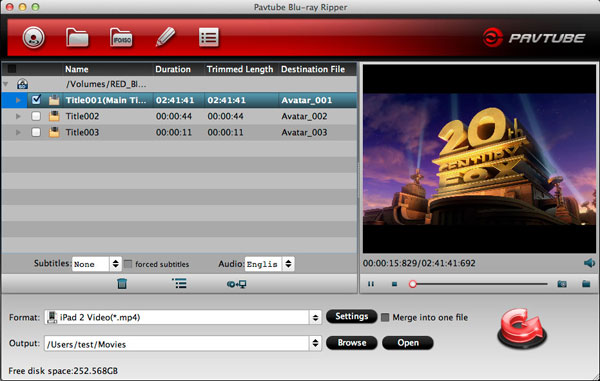
Step 1: Import Blu-ray/DVD to the top Blu-ray to Android Mac video converter.
Launch Pavtube Blu-ray Ripper for Mac, and then click the button add from Blu-ray disc to load the Blu-ray/DVD movie to the program.
Step 2: Select an output format for Android devices.
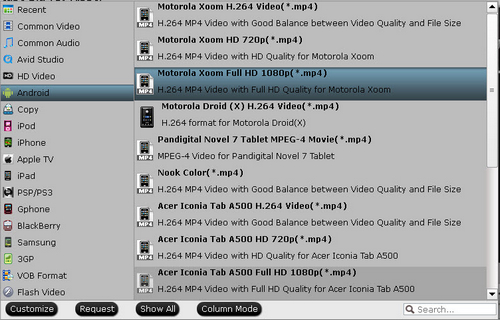
Click on the format bar and then move your pointer to “Android”, under the sublist, you can find output format for all kinds of Android devices such as Motorola Xoom H.264 Video (*.mp4), Nook Color (*.mp4). Choose a suitable one for your Android device.
Step 3: Click “Settings” icon to adjust audio and video parameters.
Click the “Settings” icon and you will enter a new interface named “Profile Settings”. You can adjust codec, bit rate, frame rate, sample rate and audio channel in the interface according to your needs and optimize the output file quality.
Step 4: Start ripping Blu-ray movie to Android device on Mac.
Click the “Convert” button, the Pavtube Blu-ray to Android Mac video converter will start to rip Blu-ray movie to Android devices immediately. After the conversion finished, you can transfer the Blu-ray movie to Android device for enjoying.
 Free Trial Blu-ray Ripper for Mac

Useful Tips
- Convert 1080p HD Videos to Top 5 Android Tablets or Phones on Windows or Mac
- Make Blu-ray films playable on Nexus 7 FHD 2013 Second Generation
- How to make WMV movies playable on Kindle Fire HD?
- 10 Best Android Video Players for Kindle Fire HD
- The Hottest Android games for Kindle Fire HD: the 10 Best Kindle Fire HD Games
- Top 20 Must-Have Free Apps for Kindle Fire HD




