

 Home
Home
Pavtube offers the best Galaxy Tab DVD Ripper for both PC and Mac OS. The Galaxy Tab DVD Ripper handles converting DVD video to Galaxy Tab compatible H.264, MPEG-4, DivX videos at fairly fast speed and never lets users into A/V sync issues. This guide is written to tell you how to rip DVD to Galaxy Tab video (Galaxy Tab 1 & Galaxy Tab 2) on Mac OS.
Required tools:
Pavtube Galaxy Tab DVD Ripper for Mac (download link)
Mac Desktop/laptop running Mac OS X 10.4 or above
Steps for watching DVD movies on Galaxy Tab 10.1/8.9 videos (Mac only)
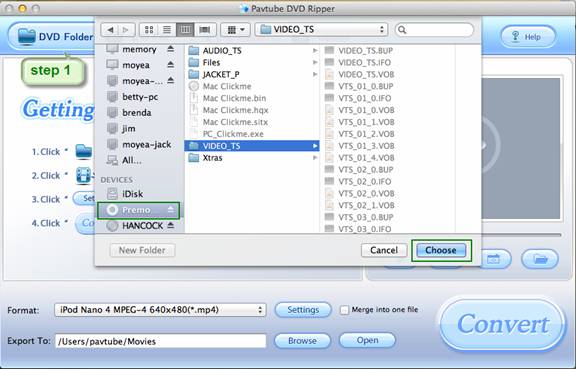
Step 1. Import DVD to the Galaxy Tab DVD Ripper for Mac
Click “DVD Folder” to load DVD for conversion. If your DVD is saved as files on your computer, click “DVD Folder” and browse to the folder that contains DVD files.
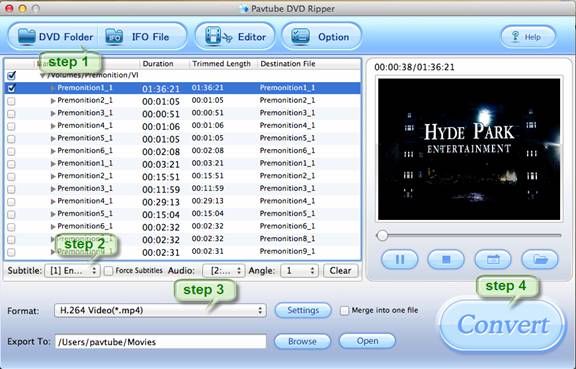
Step 2. Set subtitles and audio language for putting DVDs to Galaxy Tab 10.1/8.9
Select subtitles and audio track (English, French, German, Spanish…) for each chapter from the drop-down list of “Subtitles” and “Audio” box.
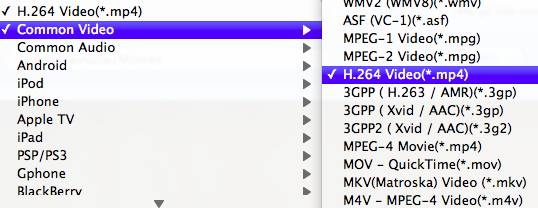
Step 3. Set H.264 .mp4 format for copying DVD to Galaxy Tab video.
Click the “Format” bar, and choose “Common Video”>> “H.264 Video (*.mp4)” for conversion. H.264 .mp4 is recommended because it not only works on Galaxy Tab 10.1/8.9/7.0, but also on iPad, Apple TV, iPhone 4, Galaxy S phones, etc.
Step 4. Convert DVD movie to Galaxy Tab video.
Click the “Convert” button to start converting DVD movie to Galaxy Tab playable videos. It takes about 10-20 minutes before you can watch DVD movie on Galaxy Tab. After conversion you can click the "Open" button to find the converted files and put the movies to Galaxy Tab 10.1/8.9 using Samsung Kies Mini.
Tip: This Galaxy Tab DVD Ripper for Mac removes interlacing lines from DVD videos by default. You don’t need to set de-interlace manually.
Other apps that puts movies to Galaxy Tab 10.1:
Galaxy Tab 10.1 DVD Ripper for Windows
Galaxy Tab 10.1 Blu-ray/DVD Ripper for Mac
 Free Trial DVD Ripper for Mac

Useful Tips
- How can I Play Flash Video (FLV, F4V) on Kindle Fire HD?
- Connect Kindle Fire HD to Computer (Windows/Mac) for Files Transfer
- Enable Surface RT & Pro Tablet to Play MKV/AVI/MPG/TiVo/VOB Files Effortlessly
- How to Play VOB on Kindle Fire without any Hassle ?
- Enable Microsoft Surface RT/Pro Tablet to Play Flash FLV/F4V Videos
- Samsung Galaxy Tab AVI – put and play AVI on Galaxy Tab




