

 Home
Home
Pavtube Mac bluray copy tool, the best bluray ripping software developed for Mac, is capable of copying blu-ray videos, so as to process Mac blu ray backup, or rip blu ray on Mac for playback on various multimedia devices, like iPhone 4, iPad, Apple TV, Dell Streak, Archos 101, Galaxy Tab, Droid X, HTC Evo 4G, Samsung Vibrant, Nokia N8, PSP, Xbox 360, Popcorn Hour, WD TV, etc.
What can Pavtube Mac bluray copy tool do for you?
- Do Mac BD backup, and rip blu ray on Mac.
- Convert regular DVDs, Blu-ray movies to MOV, MP4, M4V, H.264 and more other file types.
- Support selecting specified language as subtitles and audio track.
- Support making Blu-ray 1:1 copy.
Guide on how to do Mac BD backup, and rip blu ray on Mac
Step 1: Free download the Mac bluray decrypter, install and run it
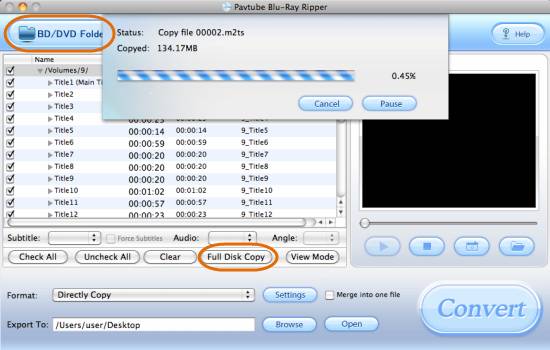
Click “BD/DVD Folder” to load your BD movie files. The Mac blu ray backup software enables you to make 1:1 copy of your Blu-ray movies without loosing the original structure and contents. To make 1:1 copy, when the source BD files are loaded, just click “Full Disk Copy” icon to do so. Once the copying task is completed, you can click “Open” button to get the blu-ray copy. Notice that “Full Disk Copy” requires large storage space, since the source BD movie always has big size.
Step 2: Select output format
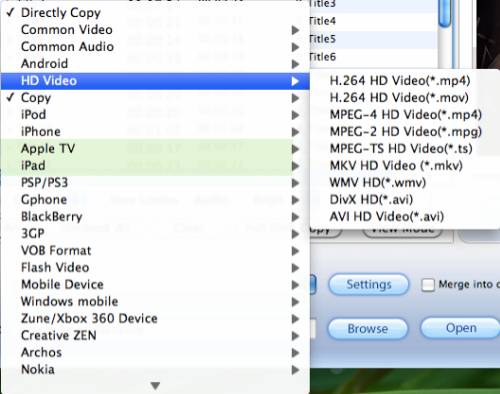
To rip blu ray on Mac, you need click on the dropdown menu of “Format” to select your needed format as target format.
For instance, if you wanna rip bluray to iPad, you can choose iPad format as output format. If you wanna copy bluray to Apple TV for watching, you can select Apple TV format as output format.
Step 3: Adjust video and audio parameters
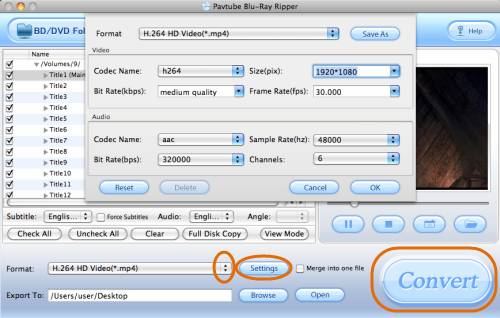
When processing bluray backup on Mac, the Mac blu ray backup software allows users clicking “Settings” button to adjust video and audio parameters, including codec name, size, bit rate, frame rate, sample rate, and audio channel, so as to customize the final output file quality.
Step 4: Start ripping blu ray on Mac
Click “Convert” button to rip bluray on Mac. Once the Mac BD backup is finished, you are able to click “Open” button to get the ripped files with ease.
 Free Trial Blu-ray Ripper for Mac

Useful Tips
- How to keep original/ correct aspect ratio for 16:9 and 4:3 display?
- Blu-ray Ripping- improve Blu-ray converting speed with GPU acceleration
- Convert MKV to H.264 MP4 for streaming over DLNA
- How to Play Blu-ray Movies on Android Tablet?
- Blu-ray ripping- how to keep 5.1 and 7.1 audio?
- [How to] Turn your Blu-rays to iTunes playable 1080p MP4 movies




