

 Home
HomeSo you just have an Apple iPad 2 on hand? Wanna make full use of its 9.7-inch wide screen to watch your AVCHD recordings captured by a handycam/camcorder/camera? In that case, you need a practical AVCHD to iPad 2 converter to help you transcode AVCHD to iPad 2 compatible videos with best quality. Go to see a detailed guide on how to transfer AVCHD videos to iPad 2 in the following contents. You may also be interested in Top 10 Free iPad 2 Games.
Pavtube Video Converter will regard as the best iPad owner necessary app to have. It will help you make AVCHD files to iPad for playback without any hassle. What features make this converter outstanding among others?
- Super fast conversion speed and perfect audio and video synchronization.
- Convert/transfer videos to iPad 2/iPad, iPhone 4, iPod, Apple TV, PS3, Droid X, Motorola Xoom and more.
- Convert AVCHD MTS/M2TS, MKV, AVI, WMV, MTS, TiVo...files to iPad 2
- Generate 720p H.264, MPEG-4 files in .mp4 format for iPad 2
Hot search: AVCHD to ProRes for FCP, 3D AVCHD Tips, 1080i AVCHD on Windows


How to convert/transcode/copy AVCHD to iPad 2 with best quality?
Step 1. Run Pavtube AVCHD to iPad 2 converter
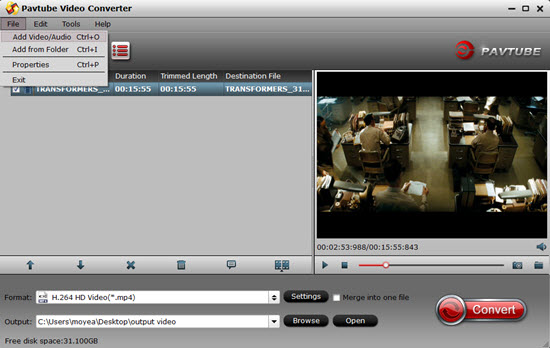
Click "Add" button to load your AVCHD recordings. If your files are on the desktop, you can directly drag-and-drop into the main UI to save time.
The program supports batch conversion, so you can add multiple AVCHD files to convert at a time. If you wanna combine your loaded files into a single file, you can tick off the checkbox "Merge into one file".
Step 2. Select output format for iPad 2
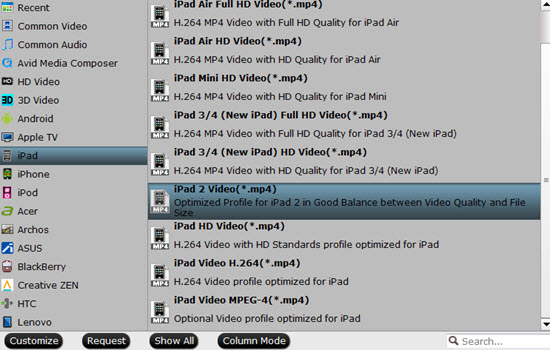
Click on the dropdown menu of "Format", and then choose "iPad" > "iPad 2 Video (*.mp4)" as target format. This format preset is optimized for iPad 2, which will guarantee you a best playback quality when viewing on your iPad 2 tablet.
Step 3. Convert/transcode/copy AVCHD to iPad 2 with best quality
Click "Convert" button to start transferring AVCHD videos to iPad 2 compatible file format by using AVCHD to iPad Converter. When the conversion is done, you can click "Open" button to get the output 720p mp4 videos for playback on your new iPad 2. Have fun.
Further Reading:
iPad and Mac Mirroring - How to stream Video from Mac to iPad and Vice Versa?
MKV to iPad 2 Converter - Convert 1080p MKV to 720p MP4 for iPad
 Free Trial Video Converter





