

 Home
HomeMost HD (High-definition) digital camcorders create HD files with *.mts as extension, especially the AVCHD and AVCHD Lite camcorders. MTS is not so widely accepted by media players as common video formats like MP4, WMV and AVI. If you'd like to play MTS contents in Windows Media Player, transfer MTS videos to iPad, iPhone, iPod, PSP, Android phones for playback, or watch MTS shootings on HDTV freely, a best way is converting MTS to MP4 format.
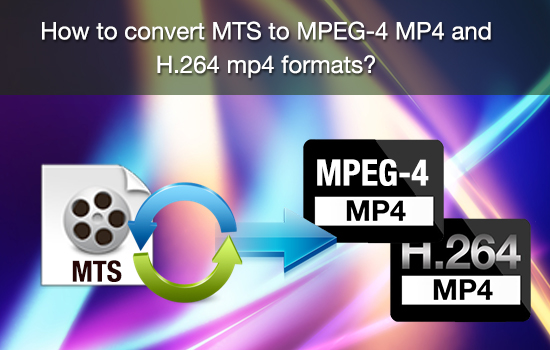
This guide tells you how to convert MTS to MP4 with Pavtube MTS/M2TS Converter. The Pavtube AVCHD Converter is a powerful solution for converting MTS to H.264 MP4, MPEG-4 MP4 up to 1080p. It not only converts MTS to MP4 with high quality, but also features easy-to-use editing facilities. You can join MTS files together, trim out unwanted frames, remove the interlaced lines, set 5.1 surround sound, replace audio with your favorite music, and customize file size and video quality when converting MTS to MP4 for your portable players.


Step-by-step guide of converting MTS to MP4/M2TS to MP4/AVCHD Lite to MP4
Please make sure the MTS Converter has been downloaded and installed. You may download its free trail version of AVCHD Lite to MP4 Converter. It is a clean program with no limitation in function.
Step 1: Load source files to the MTS to MP4 Converter
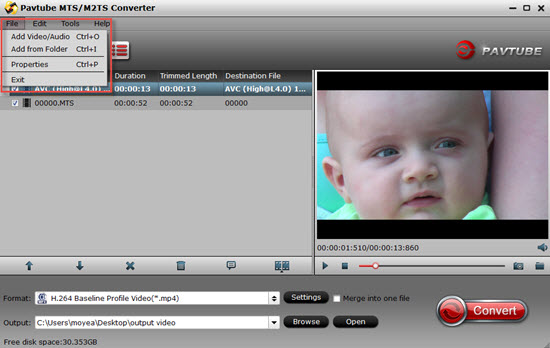
Launch Pavtue MTS to MP4 Converter and the window below will pop up. Click the "Add Video" or "Add from folder" button on the upper left to load your MTS files. You can select any of them and click play button to preview. If you would like to join MTS files together, just select these files and check the "Merge into one"box.
Step 2. Select output format for converting MTS/M2TS to MP4.
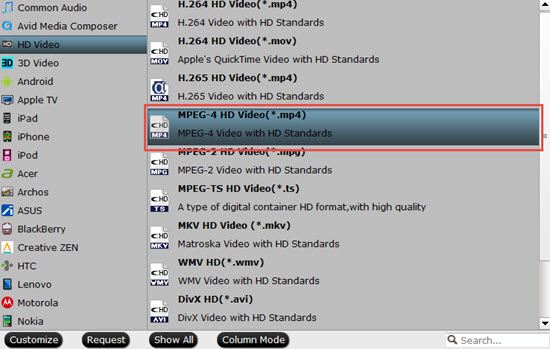
Click on "Format", and select output format from the drop-down list. H.264/AVC and MPEG-4 encoded MP4 formats are available. If you would like to play the MTS recordings on portable players like iPad, iPhone, PSP, Android, Archos, Zune, PocketPC, etc, simply follow the corresponding profile group and select customized MP4 format. If you would like to watch the MTS contents on HDTV via media players (e.g. Western Digital Media Player, Video DVD combos), HD quality should be attained. To maintain HD video quality, you may follow "HD Video">"H.264 HD Video"(*.mp4) or "MPEG-4 HD Video (*.mp4) and customize the A/V parameters based on the media player and your TV. Or want to burn your videos into DVD, this app can realize the goal.
Tips:
All the options decoded by H.264 under "HD Video" will output as H.264 High Profile, which will maintain the sharp quality of original files.
Step 3: Start converting MTS to MP4
Click "Convert"button to convert AVCHD/AVCHD Lite to MP4 . After conversion you can click "Open"button to get the generated MP4 files.
Useful Tips:
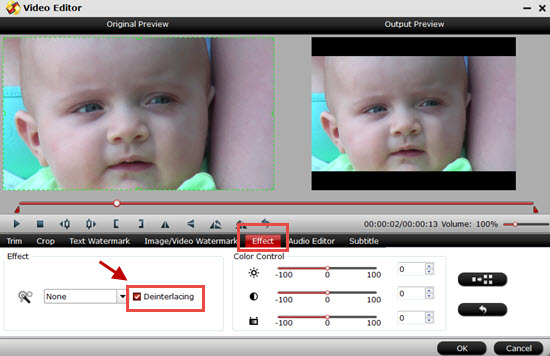
1. Eliminate the interlacing lines: click "Editor"menu, switch to "Effect"and check the box of "Deinterlacing"when your source MTS files are interlaced 1080i or 720i videos.
2. Customize MP4 format for your player.
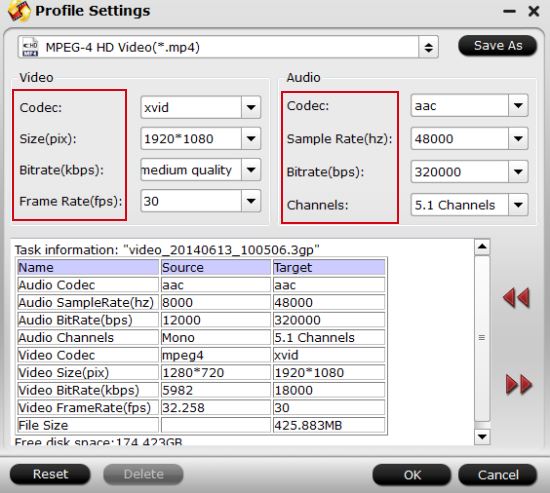
Click "Settings" button to adjust video and audio parameters. Notice that you can not "convert up"video quality. If you selected HD Video in Step 2, we advise you to adjust the A/V parameters to be the same with source MTS footage so as to bear least quality loss at proper file size.
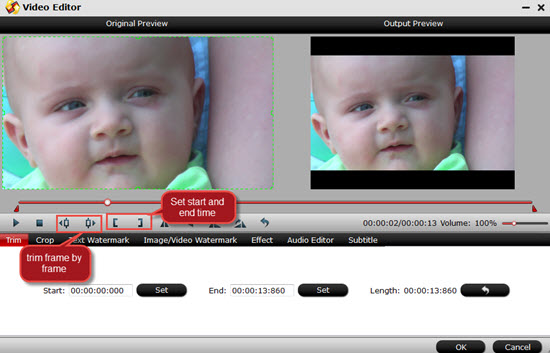
3. Trim out unwanted frames: click "Editor"menu, switch to "Trim"tab, plays the video, click "["to set start time and "]"to set end time. The duration will be preserved and other part will be trimmed out. By trimming you can cut out unwanted part and remains only desired frames.
4. For more about AVCHD (MTS/M2TS) playing, editing , DVD buring , just go to this AVCHD Page.
 Free Trial MTS/M2TS Converter





