

 Home
Home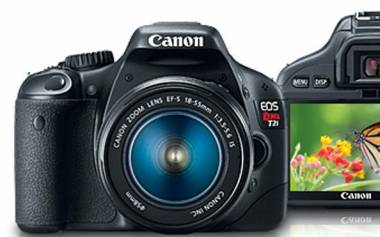
Canon T2i brings professional EOS features into an easy to use, lightweight digital SLR, which has an advanced HD Movie mode for gorgeous Full HD movies. The T2i allows users shoot footage at 1920x1080, 1280x720 or 640x480 pixels with 30fps, 25fps, and 24fps. What happen is that owners of Canon T2i often encounter troubles when importing the Canon T2i video format - H.264 MOV footages shot by T2i - to video editing software for further editing, so you need convert canon t2i video to a format that is friendly for your editors, such as MP4, AVI, MPEG, WM and more. The following contents clearly show how to convert Canon T2i video to MP4, AVI, MPEG, WMV, etc. for your multiple end uses.
Required software:
Pavtube Canon T2i video converter
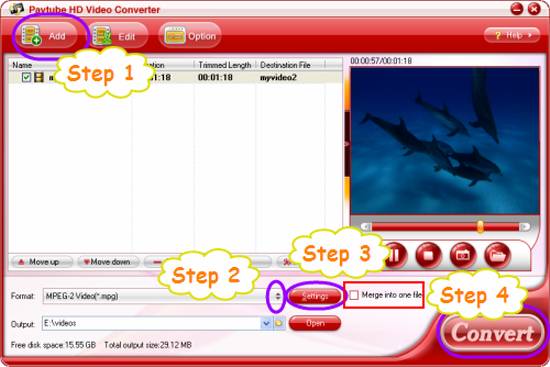
Step 1: Run T2i video converter, and load canon t2i video files to it.
Click “Add” button to import t2i video files. The Canon T2i video converter supports batch conversion, so you can add multiple files into it to convert at a time. If you wanna combine several T2i videos into a single file, you can put a checkmark in the checkbox “Merge into one file”.
Step 2: Select output format
The Canon T2i video converter supports converting T2i video to a wide range of video formats, including MP4, AVI, MPEG, WMV, MKV and more, so you can convert canon t2i video format to any file types as you like. Just click on the dropdown menu of “Format” to pick your desired output format.
Step 3: Adjust audio and video settings
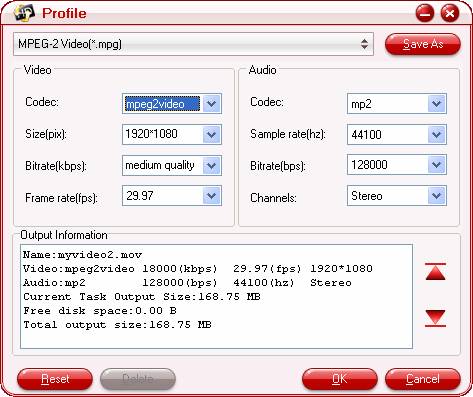
You are allowed to click “Settings” button to adjust audio and video settings before converting canon t2i video. The adjustable settings include codec name, aspect ratio, bit rate, frame rate, sample rate, and audio channel.
Step 4: Convert canon t2i video
Once the above mentioned steps are finished, you can click “Convert” button to start converting Canon T2i video to your needed format. When the conversion is completed, you can get the final output files through clicking “Open” button with ease. The canon t2i video converter comes with advanced audio and video in sync technology, which will ensure you perfect audio and video synchronization.
 Free Trial HD Video Converter





