

 Home
Home
Wanna find a single app to do the full bluray to iPad 2 conversion in one go? Pavtube Blu-ray to iPad 2 Converter would be a suitable tool for you. This Blu-ray ripping software comes with full Blu-ray supports. With this program, you are able to watch your new Blu-ray movies on iPad 2 without any troubles. Go to see a detailed guide on how to convert Blu-ray to iPad 2 supported file formats by using the Pavtube Blu-ray to iPad 2 Converter.
For your reference: Audio/video playback capability of iPad 2
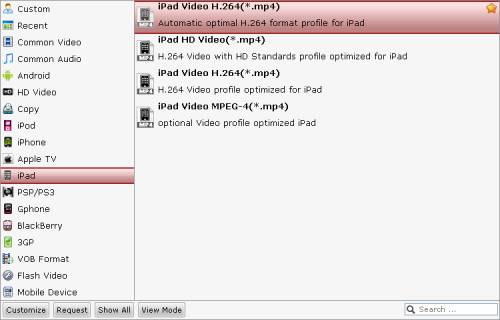
Audio formats supported: HE-AAC (V1 and V2), AAC (8 to 320 Kbps), MP3 (8 to 320 Kbps), MP3 VBR, Audible (formats 2, 3, and 4, Audible Enhanced Audio, AAX, and AAX+), Apple Lossless, AIFF, and WAV Video formats supported: H.264 video up to 720p, 30 frames per second, Main Profile level 3.1 with AAC-LC audio up to 160 Kbps, 48kHz, stereo audio in .m4v, .mp4, and .mov file formats; MPEG-4 video, up to 2.5 Mbps, 640 by 480 pixels, 30 frames per second, Simple Profile with AAC-LC audio up to 160 Kbps per channel, 48kHz, stereo audio in .m4v, .mp4, and .mov file formats; Motion JPEG (M-JPEG) up to 35 Mbps, 1280 by 720 pixels, 30 frames per second, audio in ulaw, PCM stereo audio in .avi file format How to do bluray to iPad 2 conversion via Pavtube Blu-ray to iPad 2 Converter? Step 1: Run Pavtube Blu-ray to iPad 2 Converter, and then click the Blu-ray disc icon, or the Blu-ray folder icon at the top left corner of the main interface to load Blu-ray movie files. Step 2: Click on the pull down menu of “Subtitle” and “Audio” respectively to select your needed languages as output subs and sound track. Step 3: In order to watch Blu-ray movies on iPad 2, you need click on the dropdown list of “Format” to select an output format for your iPad 2 tablet. This bluray to iPad 2 conversion tool provides users with 4 format presets optimized for iPad, and you can choose any one of them as target format to get a well playback quality when watching on iPad 2. Step 4: Click “Convert” button to convert Blu-ray to iPad 2 playable format. With CUDA Acceleration technology and optimized audio and video in sync technology, Pavtube Blu-ray to iPad 2 Converter can finish conversion at speed without letting you encounter any troubles caused by audio and video out of sync issues. When the bluray to iPad 2 conversion is completed, you can click “Open” button to get the converted BD files for your tablet easily. Now you are ready to watch Blu-ray movies on iPad 2. Enjoy it. Try Pavtube Blu-ray to iPad 2 Converter for Windows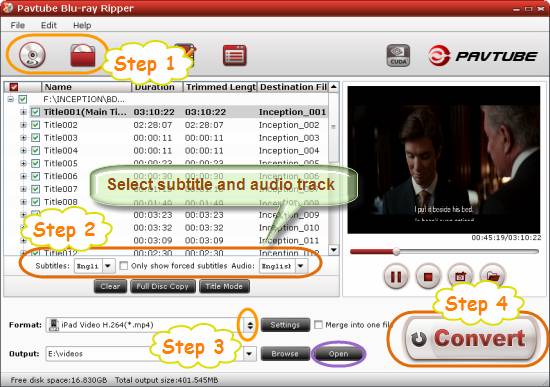
 Free Trial Blu-ray Ripper





