

 Home
Home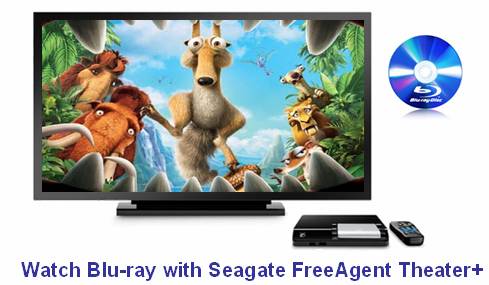
The Seagate FreeAgent Theater+ HD Media Player offers a simple way to store and move your movies/videos, photos, and music from your PC or Mac computer to your TV, allowing you to watch, share and enjoy your digital media files in comfort. Have you ever thought about using the 1080p media player to play back Blu-ray movies with 1080p video and surround sound audio? Supposing you have not found an available solution, then this article may be of some help for you. It provides Mac users with a workaround on how to watch Blu-ray with Seagate FreeAgent Theater+ HD Media Player by using Pavtube Mac Blu-ray to Seagate FreeAgent Theater+ Converter. Go to see a detailed guide in the following contents.
How to watch Blu-ray with Seagate FreeAgent Theater+ HD Media Player? (for Mac)
Briefly speaking, to watch Blu-ray with Seagate FreeAgent Theater+, what you need do is just decrypting the copy protection applied in a commercial BD movie, and play the M2TS streams directly, or you can rip Blu-ray to Seagate FreeAgent Theater+ supported other HD formats to use less storage space of your external hard drive. The details of the two methods are listed as below.
For your reference:
Seagate FreeAgent Theater+ HD Media Player supported video formats:
MPEG–1, MPEG–2 (VOB/ISO), MPEG–4 (Xvid), DivX®, DivX HD+ , Xvid HD, AVI, MOV, MKV, RMVB Real Media, AVC HD, H.264, WMV9, VC–1, M2TS, TS/TP/M2T
Method 1: Do “Full Disk Copy” to remain Blu-ray originals.
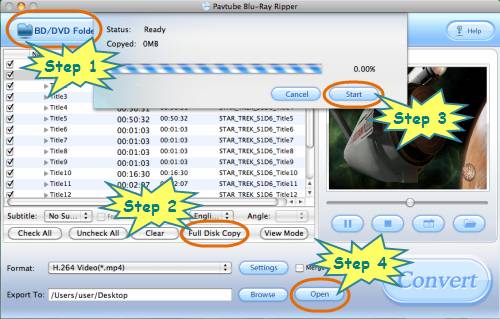
Step 1: Click “BD/DVD Folder” to load your Blu-ray movie files
Step 2: Do “Full Disk Copy” to rip Blu-ray to Seagate FreeAgent Theater+
Once your source BD movie files are loaded, you can directly click “Full Disk Copy” to rip Blu-ray to Seagate FreeAgent Theater+.
Step 3: Click “Start” button to start Blu-ray full disk copying
As long as you click “Full Disk Copy” icon of Mac Blu-ray to Seagate FreeAgent Theater+ Converter, a dialog window will pop up, just click the “Start” button on it to begin Blu-ray copying.
Step 4: Click “Open” button to get the final output files
Once the copying task is finished, you can click “Open” button to get the final output M2TS files to your Seagate FreeAgent Theater+ HD Media Player for playback.
Method 2: Convert Blu-ray to a HD format that is compatible with Seagate FreeAgent Theater+ HD Media Player
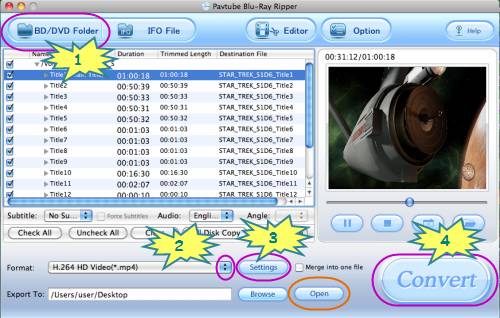
Step 1: Click “BD/DVD Folder” to import your Blu-ray movie files
Step 2: Select output format for Seagate FreeAgent Theater+ HD Media Player
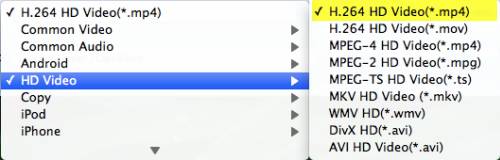
Click on the pull down menu of “Format”, and then tap on “HD Video”, after that you will see there are lots of HD video formats available, including H.264 HD Video, MPEG-2 HD Video, DivX HD Video, MPEG-4 HD Video, MKV HD Video, and more. We choose “H.264 HD Video (*.mp4)” as an example.
Step 3: Customize video and audio settings
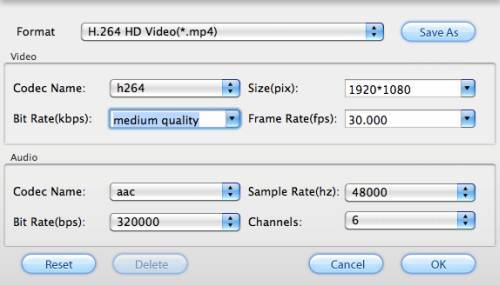
Pavtube Mac Blu-ray to Seagate FreeAgent Theater+ Converter allows users clicking “Settings” button to adjust audio and video parameters. The options including codec name, aspect ratio, bit rate, frame rate, sample rate and audio channel are all adjustable in the following pop up window.
Step 4: Rip Blu-ray to Seagate FreeAgent Theater+ HD Media Player
Click “Convert” button to rip Blu-ray to Seagate FreeAgent Theater+ with Pavtube Mac Blu-ray to Seagate FreeAgent Theater+ Converter. Once the ripping task is completed, you can click “Open” button to get the converted Blu-ray files. By then copying these files to your external hard drive, and placing it into the Theater+ HD media player. Once you connect your external hard drive with your HDTV, your favorite Blu-ray movies are at your fingertips with 1080p video and surround sound audio. Just watch Blu-ray with Seagate FreeAgent Theater+ HD Media Player for more fun.
 Free Trial Blu-ray Ripper for Mac

Useful Tips
- play back Blu-ray movie via Seagate GoFlex TV HD Media Player
- Watch Blu-ray via Seagate HD Media Player (For Mac users)
- Watch Blu-ray with Seagate FreeAgent Theater+ HD Media Player
- How to rip Blu-ray to Seagate HD Media Player with forced subtitles?
- How to watch Blu-ray with Seagate GoFlex TV HD Media Player?
- How to play Blu-ray with Seagate FreeAgent Theater+ HD Media Player?




