

 Home
Home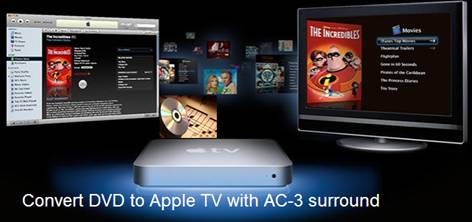
Ever thought of putting your DVD collections to Apple TV? Why not? With digital backups on Apple TV, you will never have to hunt for a movie in hundreds of DVDs and then bother to place it in a DVD player. Instead, you just sit on the bed and select desired movie with a handy remote control. Apple TV does not play surround sound? No worry about that. The Apple TV itself can not decode AC3 5.1 codec, but it is able to optically pass through the AC3 audio to your AV receiver that output 6 channels to your speakers. By that means you can still get DVD movie with AC3 surround sound from Apple TV with the help of a Dolby Digital supported receiver. The question is, how to copy DVD movie to Apple TV supported video while keeping the AC3 track? Let Pavtube DVD Ripper for Mac help you. The Pavtube DVD Ripper for Mac is able to convert DVD to Apple TV, iPad, iPhone 4, iPod Touch 4, PS3 and many other devices on Mac OS X for playback. Feel like watching DVD movie on Apple TV with AC3 surround sound? Just download a free trial of Pavtube DVD Ripper for Mac and follow this guide to rip DVD to Apple TV meanwhile extract the AC3 audio track!
Step-by-step guide of converting DVD to Apple TV with AC3 5.1 track:
Step 1. Load DVD to the software for converting to Apple TV.
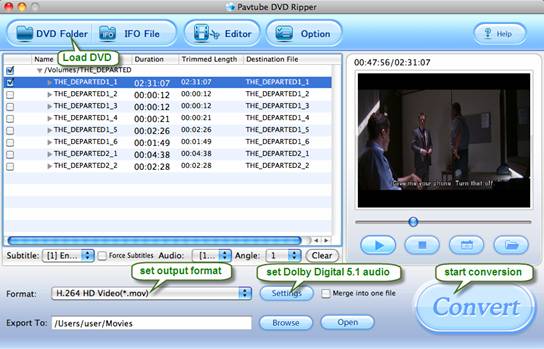
Insert a source DVD in optical drive. Install and launch the Pavtube DVD Ripper for Mac software, click “DVD Folder” and navigate to the DVD Video_TS folder, click “Choose”. When the DVD is loaded to DVD Ripper, you can select subtitles and audio track (English, French, German, Spanish…) for each chapter. Forced subtitles can be attained, too.
Step 2. Set an Apple TV format that is encoded with H.264/ AC3.
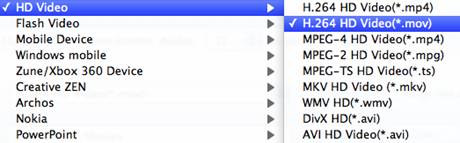
Click on “Format” bar to select output format. Here you are advised to follow “HD Video”and select “H.264 HD Video (*.mov)”. Under the tab of “Apple TV” there are Apple TV optimized formats with AAC 5.1 and stereo audio.
Step 3. Get AC-3 5.1 surround sound and proper aspect ratio.
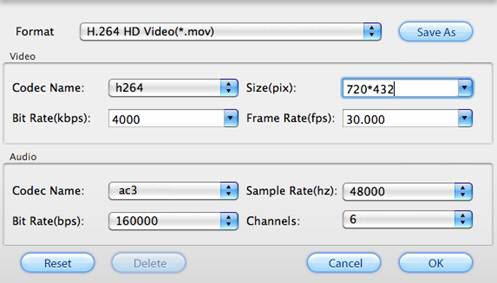
Click on “Settings” and you could further customize video and audio parameters. For DVD to Apple TV conversion, optimal settings should be Video Size- 720*432 (for a 16:9 screen) or 720*480 (for a 4:3 screen), Video Bitrate- 4000kbps at highest quality, Video Frame rate- 24fps or 30fps, Audio codec- ac3, Audio Sampling rate- 48000hz, Audio Bitrate- 160kbps, Audio Channels- 6 Channels, just as it shows in below picture. Don’t forget to click on “OK” to confirm your settings.
Step 4. Start ripping DVD to Apple TV video with Dolby Digital 5.1 track!
Click on “Convert” button to start DVD to Apple TV conversion on Mac. The Mac DVD Ripper will bypass copy-protections and convert DVD to Apple TV video with AC3 6 channels track. After conversion you can click “Open” button to get the final ripped DVD files (H.264/ AC3 MOV videos).
Step 5. Sync the ripped DVD movie to Apple TV for playback.
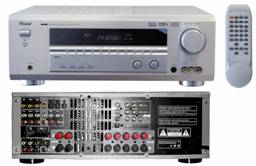
Connect Apple TV with your Mac. Open iTunes, find the Movies library of Apple TV in DEVICES, and drag the converted DVD movies to the Movie library of Apple TV. Or you may copy the movies to iTunes Library and sync them to Apple TV in batches. When playing ripped DVD movie with Apple TV, make sure an optical cable is used to pass through AC3 5.1 track to your AV receiver. Some folks find audio is missing while video plays fine. This is because they are using Analog audio ports to output audio instead of Optical digital audio port, or the connected AV receiver/amplifier does not support AC-3 decoding.
Please also feel free to:
Learn more about the Pavtube DVD Ripper for Mac.
Take a look at a more powerful application, the Pavtube Blu-Ray Ripper for Mac that rips DVD and Blu-ray to Apple TV on Mac OS.
Find a program to rip DVD to Apple TV with AC3 5.1 track on Windows 7- the Pavtube DVD Ripper for Windows.
 Free Trial DVD Ripper for Mac

Useful Tips
- How to Convert HD TiVo/M2TS to 1080p MP4 for Apple TV 3?
- How to Convert Videos for Playback on Apple TV?
- Play HD videos on Apple TV with Dolby Digital 5.1 pass-through sounds
- How to convert Blu-ray to Apple TV with 5.1 surround sound on Mac?
- Convert Blu-ray/DVD movies to iTunes 11 for streaming to Apple TV 3 with 5.1 surround sound
- Guide for Pavtube Video to Apple TV Converter




