

 Home
HomeA Mac fan probably owns more than a Mac Desktop or iMac. This year Apple has brought for the fans pleasantly surprises, the iPad, iPhone 4, iPod Touch 4 and more. All these are beautifully designed devices equipped with Retina display, creating crisp and vivid picture, which is perfect for movie playback. Many folks have taken advantages of the Retina display by copying their DVD and blu-ray movie collections to iTunes and transferring them to their iPad, iPhone 4 or iPod Touch 4 for playback. Here a question comes up with some Apple fans: Is there a general format that is compatible with iPad, iPhone 4 and iPod Touch 4? No one would be pleased to rip one movie twice just because he owns iPad and iPhone 4! Luckily there is optimal format for ripping DVD and blu-ray movies to iPad, iPhone 4, iPod Touch 4, and Apple TV. And this format is H.264/AAC MP4.(See a universal format for a 1080p playback on both the Apple TV 3 and iPad 3).
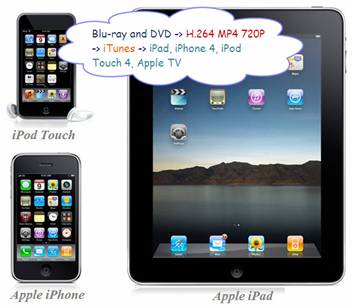
Let’s take a look at supported video formats by iPad, iPhone 4, iPod Touch 4, and Apple TV:
H.264 video up to 720p, 30 frames per second, Main Profile level 3.1 with AAC-LC audio up to 160 Kbps per channel, 48kHz, stereo audio in .m4v, .mp4, and .mov file formats;
MPEG-4 video, up to 2.5 Mbps, 640 by 480 pixels, 30 frames per second, Simple Profile with AAC-LC audio up to 160 Kbps, 48kHz, stereo audio in .m4v, .mp4, and .mov file formats;
Motion JPEG (M-JPEG) up to 35 Mbps, 1280 by 720 pixels, 30 frames per second, audio in ulaw, PCM stereo audio in .avi file format
H.264/AAC MP4 - the best universal video format for ipad, iphone and ipod
We choose H.264 codec over MPEG-4 and M-JPEG due to H.264 can compress video into smaller size and maintain the same video quality. As to AAC? Apple has picked it out for us. Why use MP4 instead of M4V and MOV? Because MP4 ranks among the most popular video formats, and is supported by various other devices, for instance, PS3 and Android Phones.
720P – wide screen, HD quality and acceptable file size
There are three reasons we choose 1280*720 over 640*480pix: firstly, 720P brings better image quality; secondly, 720P allows you to keep correct and wide screen aspect ratio for blu-ray and most DVD movies, you’ll have movies at 16:9 instead of 4:3, the picture will not be stretched when playing back; lastly, even 720P does not mean huge file size, you can still adjust other parameters to reduce file size.
Pavtube iMedia Converter for Mac – an all-in-one pack to rip DVD and blu-ray movies to H.264/AAC MP4 720P for iPad, iPhone 4, iPod Touch 4, and ATV
Pavtube iMedia Converter for Mac is recommend to help you rip DVD and blu-ray movie to H.264/AAC MP4 720P for iPad, iPhone 4, iPod Touch 4, and Apple TV. This program integrates a Blu-ray ripper for Mac, a 3D Blu-ray Ripper for Mac, a DVD ripper for Mac and a Video Converter for Mac together as a single piece of software, which means users can use this program to rip DVD to iTunes and make DVD movies playable on iPad, convert bluray to itunes video, convert blu-ray movie to iPhone 4 and rip blu-ray for new ipad 3. Plus, it also converts video files in format of TiVo, AVI, MTS, MKV, M2TS and more to iPad, iPhone 4, iPod Touch 4, and Apple TV playable file formats.
Guide - rip DVD and blu-ray movie to H.264/AAC MP4 720P for iPad, iPhone 4, iPod Touch 4, and Apple TV
Step 1. Load blu-ray and DVD for ripping to iPad, iPhone 4, iPod Touch 4, and Apple TV
Run this versatile Apple Converter for Mac, after the following interface pops up, you can click "Add Video" to load videos in different file formats, like TiVo, AVI, MTS, MKV, M2TS, etc., and you can click "BD/DVD Folder" to load Blu-ray or standard DVD files, or you can click "IFO File" to load DVD IFO files.
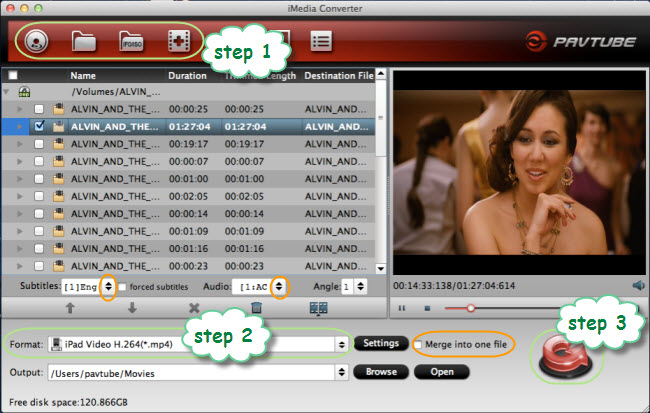
Step 2. Set 720p H.264/AAC MP4 for iPad, iPhone 4, iPod Touch 4, and Apple TV
Click the drop down list of "Format" and select "iPad">> "iPad Video H.264(*.mp4)".
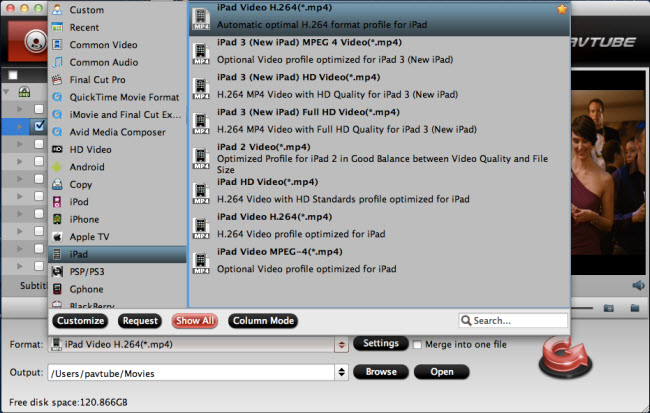
Now we can click "Settings" button to further customize the H.264 MP4 to be suitable for iPad, iPhone 4, iPod Touch 4, and ATV.
Recommended video settings for iPad, iPhone 4, iPod Touch 4, and Apple TV:
Video
Codec: H.264
Size: 1280*720pix
Bitrate: 1200~4000kbps
Frame rate: 24/ 30 fps
Audio
Codec: aac
Sample rate: 32000~48000hz
Bitrate: 64000~160000bps
Channels: 2 (6 is not recommended)
Set smaller bit rate to reduce file size, bigger bit rate and frame rate to get better image quality. To save the settings, you may click “Save As”, name the new format with your customized presets, so that you can find and use the format in Format >> Custom >> the name of customized format.
Step 3. Start ripping BD/DVD to iPad, iPhone 4, iPod Touch 4, and Apple TV compatible format
Click "Convert" button, and the ripping task will be processing immediately. To combine movie segments into one, check the box of “Merge into one file” before conversion starts. This converter will guarantee you an excellent playback quality on your iPad, iPhone 4, iPod Touch 4, and Apple TV. When the conversion work is finished, click "Open" button to get the final files, and sync them to your iTunes Library. Then you can transfer them to iPad, iPhone 4, iPod Touch 4, and Apple TV for watching. Hope this helps.
If you are using Apple TV 2, you may want to know the best settings for ATV 2 to get an excellent playback quality.
If you are using the new iPad 3 and Apple TV 3rd Gen, you can learn the universal 1080p format for the two Apple devices.
If you wanna play videos/movies via AirPlay, you can learn the introduction to Apple AirPlay to see the detailed operating steps.
 Free Trial iMedia Converter for Mac

Useful Tips
- How to Convert HD TiVo/M2TS to 1080p MP4 for Apple TV 3?
- How to Convert Videos for Playback on Apple TV?
- Play HD videos on Apple TV with Dolby Digital 5.1 pass-through sounds
- How to convert Blu-ray to Apple TV with 5.1 surround sound on Mac?
- Convert Blu-ray/DVD movies to iTunes 11 for streaming to Apple TV 3 with 5.1 surround sound
- Guide for Pavtube Video to Apple TV Converter




