

 Home
Home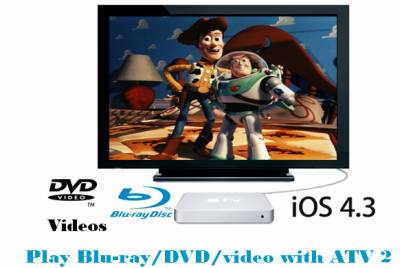
Have you already updated your Apple devices to iOS 4.3, but unfortunately found the sound in your video/movie could not be played anymore (video is fine, but audio is dead)? Actually, nearly all Apple devices (Apple TV 2, iPad, iPhone, iPod touch …) users who have updated to iOS 4.3 have encountered the same issues. It seems Apple has changed its audio processing method in iOS 4.3, or maybe it’s just a big bug. In order to solve this audio problem, Pavtube Studio has updated its products to create optimum videos for playback with Apple TV 2 without losing audio. Go to see a detailed guide on how to rip Blu-ray/DVD/video to ATV 2 playable format with best settings.
Software you need:
Pavtube Blu-ray Video Converter Ultimate
How to rip Blu-ray/DVD/video to ATV 2 with best settings?
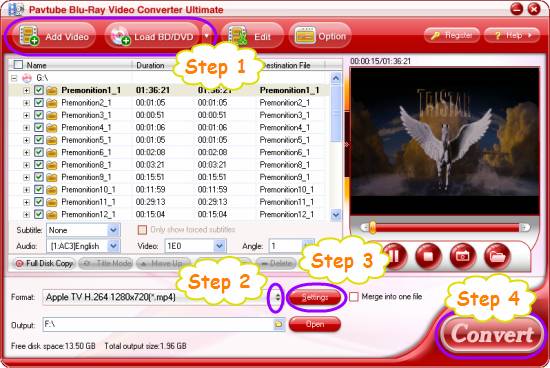
Step 1: Free download Pavtube Blu-ray Video Converter Ultimate, install and launch it
Click “Add Video” icon to load your video sources, or click “Load BD/DVD” icon to load your Blu-ray or DVD movie files.
Step 2: Select output format for Apple TV 2
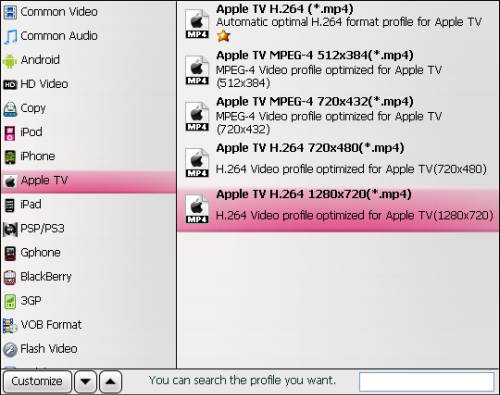
Click on the dropdown menu of “Format”, and the choose “Apple TV” > “Apple TV H.264 1280x720 (*.mp4)” as target format for your ATV 2.
Step 3: Set optimum settings for ATV 2
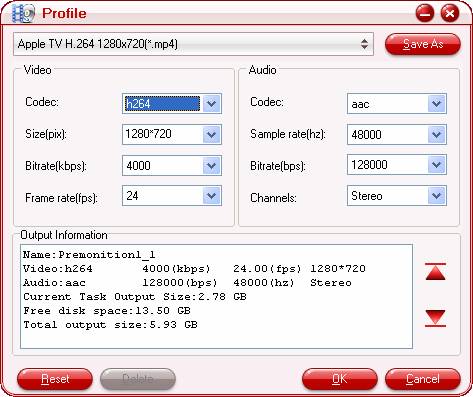
Click “Settings” button to adjust audio and video parameters to set best settings for Apple TV 2. Actually, the default settings will ensure you a perfect playback quality on your HDTV via ATV 2.
For your reference – the best settings for Apple TV 2:
Video
Codec: h264
Size: 1280*720
Biterate(kbps): 4,000
Frame raet(fps): 24
Audio
Codec: aac
Sample rate(hz): 48,000
Bitrate(bps): 128,000
Channels: Stereo
Step 4: Rip Blu-ray/DVD/video to ATV 2 with best settings
Click “Convert” button to start ripping Blu-ray/DVD/video to ATV 2 with optimum settings. After the conversion process is finished, you can click “Open” button to get the final output files with ease. Now you are ready to play Blu-ray/DVD/video with ATV 2 at excellent quality. Have fun.
If you have a new iPad 2, and wanna send iPad 2 videos to HDTV for playback, you can see our guide on how to have Blu-ray movies on iPad 2 and send iPad 2 videos to Airplay enabled Apple TV
 Free Trial Video Converter Ultimate

Useful Tips
- How to Convert HD TiVo/M2TS to 1080p MP4 for Apple TV 3?
- How to Convert Videos for Playback on Apple TV?
- Play HD videos on Apple TV with Dolby Digital 5.1 pass-through sounds
- How to convert Blu-ray to Apple TV with 5.1 surround sound on Mac?
- Convert Blu-ray/DVD movies to iTunes 11 for streaming to Apple TV 3 with 5.1 surround sound
- Guide for Pavtube Video to Apple TV Converter




