

 Home
HomeWhat is MKV?
Matroska is a multimedia container format which was derived from a project called MCF, but differentiates from it significantly because it is based on EBML (Extensible Binary Meta Language). It is an envelope for which there can be many audio, video and subtitles streams, allowing the user to store a complete movie or CD in a single file but NOT a video or audio compression format. Most media players and editors would not support playing MKV files. In that case we need to convert MKV to other formats that are more common, such as DivX AVI for easier playing or editing.
The advantages of Pavtube MKV Converter
Convert MKV files to versatile video and audio
Output MKV files on various portable devices
Support batch process and multithreading
Featured with powerful editing functions
Convert MKV to DivX step by step
Step 1. Launch MKV Converter and import MKV files
When Pavtube MKV Converter is installed, double click the icon to launch the program.
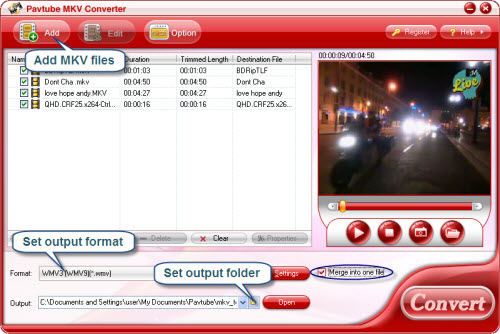
You have to firstly import MKV videos for converting into the file list by clicking Add button. Check one of them and click Play button to preview it.
Step 2. Set output settings
Now let’s set output settings: click Format bar and select Common Video-> DivX from the expand format list as output format and then click the small folder icon to determine Destination folder for the converted DivX files. Anyone who prefers higher video quality may choose high definition video may follow Format-> HD Video-> DivX HD.
Step 3. Start converting MKV to DivX
The program supports batch conversion so you could check all the files you want to convert in the file list at one time and click the big Convert button to start the conversion. After conversion you could play or further edit them freely.
If you are interested in Pavtube MKV Converter, please click here to learn more information about this program or click here to download free trial version and have a try. There is no function or time limitation so you can make full use of it.
 Free Trial MKV Converter





