

 Home
Home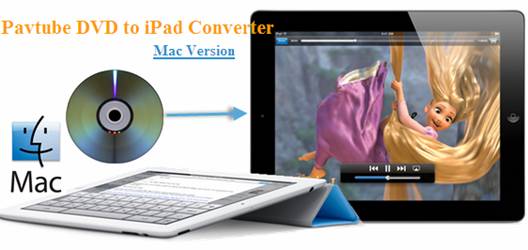
Pavtube DVD to iPad Converter for Mac software is your first choice for transferring DVD movie from Mac to iPad 2. By ripping DVD to iPad optimized H.264 and MPEG-4 video on Mac OS X 10.5, Mac users can easily put DVD collections to iTunes and iPad 2. You can download a free trial of the Mac DVD to iPad 2 Converter and follows this guide to transfer DVD movie to iPad 2 from Mac.
Access Pavtube Mac DVD to iPad Converter
Learn more about Pavtube DVD to iPad 2 Converter for Mac
Download the Mac DVD to iPad 2 Converter trial
(Tip: The software is Windows oriented. And a trial puts watermark on converted videos)
Convert DVD to iPad 2 on Mac using Pavtube DVD to iPad 2 Converter
The following guide shows how to convert DVD movie to optimized MP4 format for iPad 2 playback using Pavtube Mac DVD to iPad Converter.
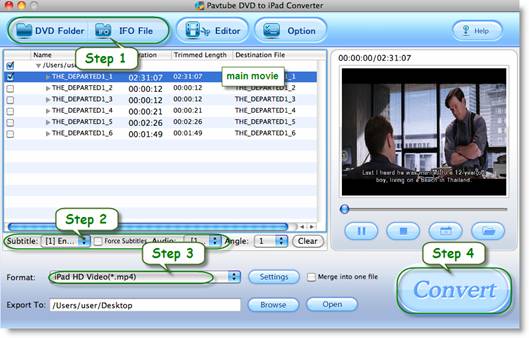
Step 1. Launch Pavtube DVD to iPad 2 Converter and import movie files.
1. Load movie from DVD. Insert source DVD into optical drive, and click “DVD Folder” to open the DVD.
2. Load movie from VIDEO_TS folder. Click “DVD Folder” and browse to target directory.
3. Load movie from DVD ISO image file. Click “DVD ISO/IFO” and browse to the DVD ISO file.
Step 2. Set audio and subtitles for DVD to iPad 2 conversion on Mac.
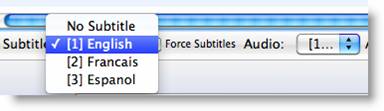
Select the main movie from DVD title list, and select a desired subtitle language. By default there is no subtitle.
Step 3. Set iPad 2 format for exporting DVD movie to iPad 2 Movie Library.
It is easy to set a format for DVD to iPad 2 conversion- just click “Format”, find “iPad” and select a desired format from its secondary list. There are 4 templates for iPad 2:
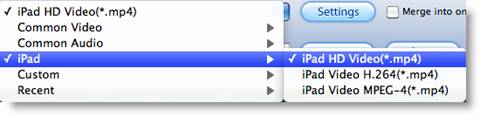
1. iPad Video H.264(*.mp4)- medium quality for DVD movie to iPad 2 conversion.
2. iPad HD Video (*.mp4)- iPad 720p (1280*720) video up to 4000kbps, the best video quality iPad 2 can play, the format takes up 3GB for a converting a 100min DVD movie to iPad 2.
3. iPad Video H.264(*.mp4)- 768*576 video, a best fit for iPad 2 screen display.
4. iPad Video MPEG-4(*.mp4)- 640*480 video, a preferred solution for saving storagewhen converting DVD to iPad 2- only 1.5 GB for saving 100min DVD movie to iPad 2 video.
Step 4. Start converting DVD movie to iPad 2 video on Mac.
Click “Convert” button to start converting DVD movie to iPad 2 optimized videos. After conversion click “Open” to find converted movie on Mac.
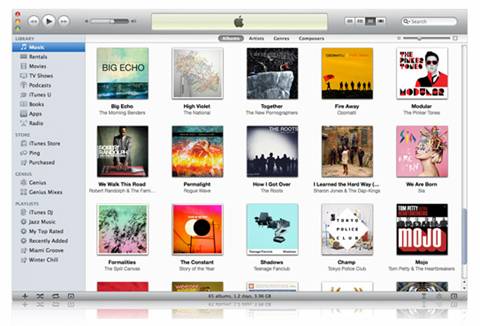
Step 5. Put DVD movie to iPad 2 thru iTunes 10.
To put DVD movie to iPad 2, iTunes 10 is a must. You can download iTunes 10 from Apple and sync DVD movie to iPad 2.
Recommended iPad Tools
Pavtube Blu-ray Ripper for Mac, an useful tool for ripping Blu-ray Disc and DVD to iPad 2, iPhone, Apple TV, etc.
Pavtube Blu-ray Video Converter Ultimate, an ultimate solution for converting video, DVD and Blu-ray Disc to iPad, iPhone, iPod, PS3, Android smartphones, etc.
 Free Trial DVD Ripper for Mac





