

 Home
Home
Pavtube bluray to AVI converter is specially developed for BD movie lovers to convert bluray to AVI file type, including converting bluray to AVI 1080p, decrypting blue ray to DivX AVI, and ripping bluray to XviD AVI. In that case, you are able to convert your beloved bluray movies to AVI for other use at will. Go to see a detailed guide on how to convert bluray to AVI in the following contents.
Blu-ray to AVI guide - how to convert bluray to AVI?
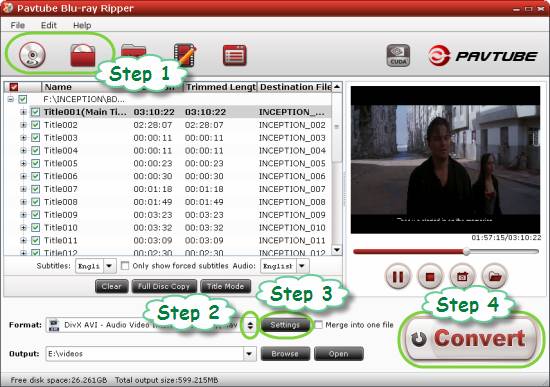
Step 1: Getting started
Run Pavtube bluray to AVI converter, and then click the blu-ray disc icon or blu-ray folder icon at the top-left corner of the main interface to import your bluray movie files, so as to convert bluray to AVI 1080p, transcode blue ray to DivX AVI, or copy bluray to XviD AVI.
Step 2: Select AVI as output format
Click on the dropdown menu of “Format”, and then hit “Common Video” to choose an AVI format from the format profile list. You can convert bluray to AVI, decrypt blue ray to DivX AVI, and rip bluray to XviD AVI. We choose “DivX AVI–Audio Video Interleaved (DivX) (*.avi)” as output format for instance.
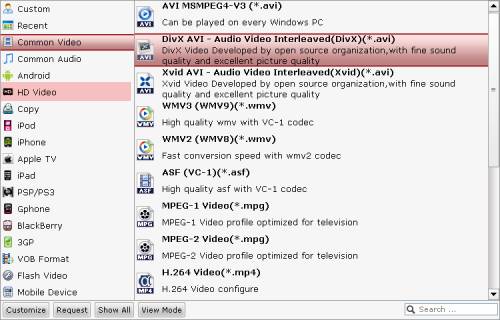
If you wanna do bluray to AVI 1080p conversion, you can choose an AVI format under “HD Video” option.
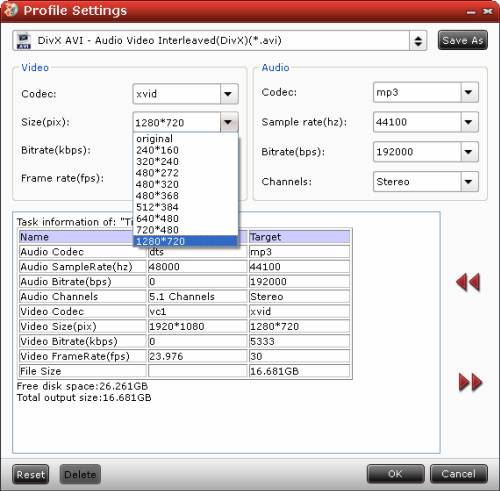
Step 3: Adjust audio and video settings
The bluray to AVI converter allows users clicking “Settings” button to adjust video and audio settings, so as to customize output file quality. The adjustable parameters include codec name, aspect ratio, bit rate, frame rate, sample rate, and audio channel.
Step 4: Start converting bluray to AVI
When the above mentioned steps are finished, you can press “Convert” button to start bluray to AVI conversion. Once the conversion is completed, you can click “Open” button to get the final output AVI files with ease.
 Free Trial Blu-ray Ripper

Useful Tips
- How to keep original/ correct aspect ratio for 16:9 and 4:3 display?
- Blu-ray Ripping- improve Blu-ray converting speed with GPU acceleration
- Convert MKV to H.264 MP4 for streaming over DLNA
- How to Play Blu-ray Movies on Android Tablet?
- Blu-ray ripping- how to keep 5.1 and 7.1 audio?
- [How to] Turn your Blu-rays to iTunes playable 1080p MP4 movies




