

 Home
HomeWhat is forced subtitles? Why backup Blu-ray movies with forced subtitles?
Forced subtitles are subtitles that included in commercial Blu-ray and partial DVD movies so as to provide a better visual experience to display the characters when a foreign or alien language is spoken, a sign, flag or other text in the scene is in different language.
Some movies like Avatar contain more than one language and if you go completely without subtitles when backing up Blu-ray, you may fail to understand the lines that are spoken in foreign languages (e.g. Navi). How to work this out? Forced subtitles option in Pavtube Blu-ray Ripper is a great choice to preserve only subtitles and lines in foreign language.
How to get only forced subtitles in Blu-ray movies?
1. Get the best Blu-ray Ripper to extract forced subtitles.
Pavtube Blu-ray Ripper is a Blu-ray/DVD copying and ripping tool that allows users to back up Blu-ray and DVD movies to various formats for different needs, so you could play the Blu-ray and DVD movies on iPhone 5, the new iPad 3, Nexus 7, Samsung Galaxy Tab 3, etc.
In addition, this app can extract subtitles from Blu-ray disc and DVDs. With a “Forced Subtitles” option, the Pavtube Blu-Ray Ripper helps users create videos with subtitle for foreign language only when ripping the blu-ray movie to MKV, AVI, MP4, WMV, TS, MOV, M4V, etc. For example, when backing up blu-ray movie Avatar, the software handles the English subtitles in the movie only when the Navi are speaking.
2. Load Blu-ray movie.
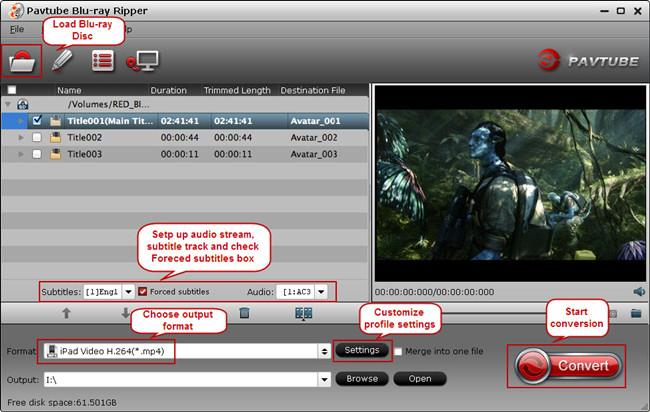
Click “Load from disc” icon to browser disc drive and import source disc.
3. Set up main subtitle track and forced subtitles.
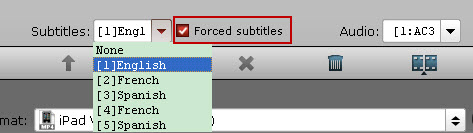
Put mouse on disc main title which is selected by default, and you are able to choose subtitle stream and audio track from drop-down list. To get forced subtitles in saved movie, remember to check “Forced Subtitles” box.
4. Choose output format and customize profile presets.
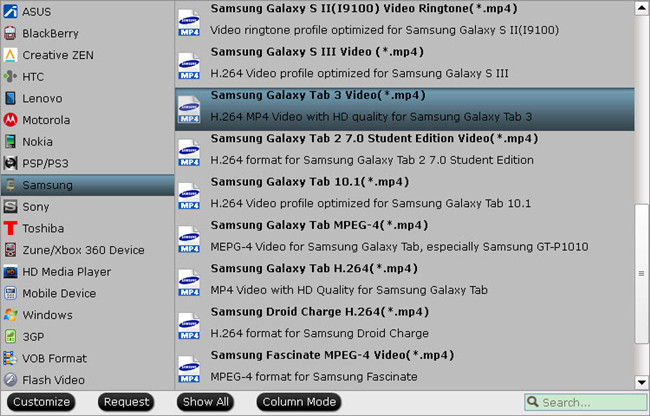
From Format menu and find the optimized profile for your device. For example, if you intend to play the converted movie with forced subtitles on Samsung Galaxy Tab 3, you could go to Samsung category, search for Galaxy Tab 3 profile and choose it for output.
In addition, you are allowed to set up profile parameters under Profile Settings to get better video and audio playback on your portable devices. You could adjust video display resolution, video and audio Bitrate, Framerate, etc.
5. Convert to get only forced subtitles.
Click the “Convert” icon on software UI to start backing up Blu-ray movie with forced subtitles. When it completes, click the “Open” button to locate the ripped Blu-ray movie and you can play the copied Blu-ray movie with forced subtitles on local computer or portable device now.
 Free Trial Blu-ray Ripper

Useful Tips
- How to keep original/ correct aspect ratio for 16:9 and 4:3 display?
- Blu-ray Ripping- improve Blu-ray converting speed with GPU acceleration
- Convert MKV to H.264 MP4 for streaming over DLNA
- How to Play Blu-ray Movies on Android Tablet?
- Blu-ray ripping- how to keep 5.1 and 7.1 audio?
- [How to] Turn your Blu-rays to iTunes playable 1080p MP4 movies




