

 Home
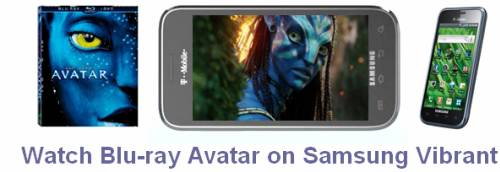
HomeThe 4.0-inch, 800x480 display makes Samsung Vibrant perfect for watching different video sources, from HD movies, camera footage, TV shows, to music videos, and more. Wanna watch Blu-ray Avatar on Samsung Vibrant? Then take a look at Pavtube Blu-Ray Ripper. With the program, copying the BD videos is not an unreachable thing any more. The following guide elaborates a detailed guide on how to use Pavtube Blu-Ray Ripper to rip BD Avatar to Vibrant supported file format, if it is what you are looking for, just feel free to read on.
Step-by-step guide:
How to watch Blu-ray Avatar on Samsung Vibrant?
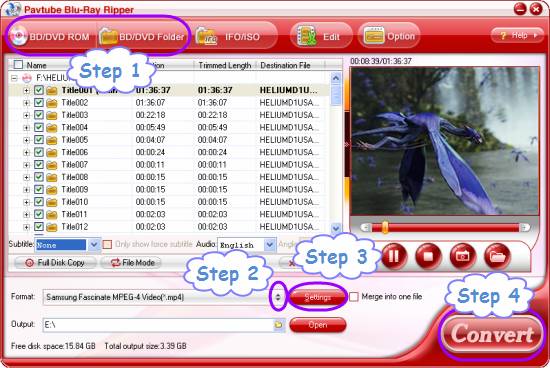
Step 1: Free download Pavtube Blu-Ray Ripper, install and launch it
Once launched it, you can click “BD/DVD ROM” or “BD/DVD Folder” to load Blu-ray Avatar movie files.
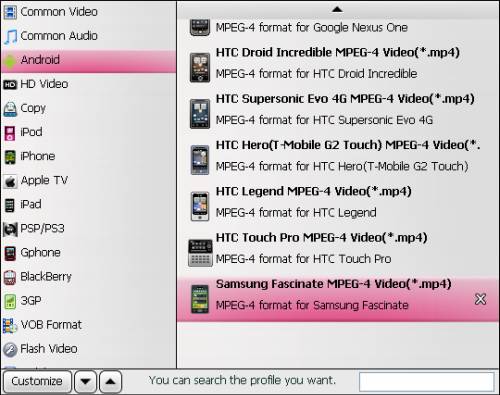
Step 2: Select output format for Samsung Vibrant
Click on the dropdown menu of “Format”, and then follow “Android” > “Samsung Fascinate MPEG-4 Video (*.mp4)”. Both Samsung Fascinate and Samsung Vibrant are belonging to Samsung Galaxy S series, the difference lays in that they are from different carriers, so the format preset for Fascinate is also available for Samsung Vibrant.
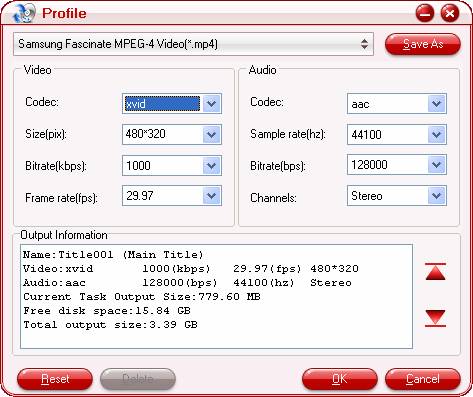
Step 3: Adjust video and audio settings to optimize output file quality
Click "Settings" button to optimize video and audio parameters. The adjustable parameters include codec name, aspect ratio, bit rate, frame rate, sample rate and audio channel. If you are not good at this step, just skip it, because the default settings will ensure you a well playback quality on your Samsung Vibrant phone as well.
Step 4: Rip BD Avatar to Vibrant
Once all the above mentioned steps are finished by Pavtube Blu-Ray Ripper , you can click "Convert" button to rip BD Avatar to Vibrant. The final output .mp4 files can be found out via clicking "Open" button effortlessly. By then you are ready to watch Blu-ray Avatar on Samsung Vibrant without any trouble.
More features of Pavtube Blu-Ray Ripper:
- Capability of recognizing almost all subtitles and audio tracks, including Dolby TureHD Audio and DTS-HD Master Audio. Forced subs are supported as well.
- Guarantee audio and video in sync.
- Support “Full Disk Copy” to remain the original Blu-ray and DVD file structure.
- Support 5.1 surround sound output.
- Support output multiple file types to satisfy your different end uses.
 Free Trial Blu-ray Ripper

Useful Tips
- Convert/Transfer Videos to Samsung Galaxy Tab for Playback
- Samsung Galaxy Note 3 Review, Specs, and Video Playback Tips
- Transfer files from internal memory to SD card for Samsung Galaxy Note II
- Three ways to transfer videos/movies from PC/computer to Samsung Galaxy S3
- Download 1080p/720p MKV movies to Galaxy S4
- How to play Videos, Music and Movies on your Galaxy S3?




