

 Home
HomeThe Acer Iconia Tab A100 is reported to be the first 7-inch tablet to run Android 3.2. With a lower price than iPad 2, Motorola Xoom 2, and ASUS Eee Pad Transformer Prime, Acer A100 seems more suitable for most consumers. It seems that the 7-inch screen makes the A100 better to express the image and video than mobile phones. Though somewhat short in battery, the Acer Iconia Tab A100 is still good for movie playback.
So, many people want to know how to play Blu-ray movie on Acer A100. Though tablet PC is not defined to play Blu-ray or DVD movies without a BD drive, we can still transcode Blu-ray to Acer A100 for playing. With Pavtube Blu-ray to Acer A100 converter, you can fulfill your task in a simple way. Pavtube Blu-ray Ripper is the best Blu-ray to Acer A100 converter works on Windows platform. Below are the details for you to convert Blu-ray movie to Acer A100 for playing.
Part1: Rip Blu-ray movie to Acer Iconia A100 on Windows.
Step 1: Click “Add” to load the movies from Blu-ray Disc. After the Blu-ray resource has been imported to the Pavtube Acer A100 Blu-ray video converter, you need click to select the main movie chapter.
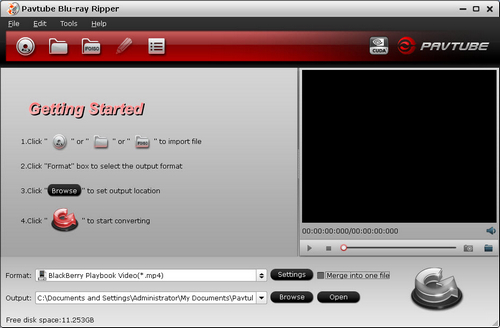
Step 2: Select preferred language from drop-down list of “Subtitles” and “Audio” box. If you don’t like subtitles, select “None” for subtitles.
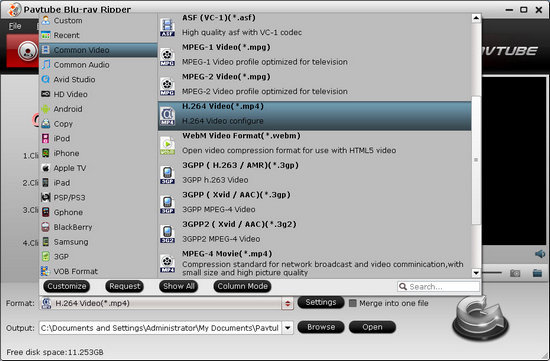
Step 3: Click “Format” bar and select “Common Video>> “H.264 Video (*.mp4)” format. The default settings fit your Acer A100, if you want change the video and audio parameters by yourself, you can click “Settings” to make it.
Step 4: Click “Convert” to rip Blu-ray movie to Acer Iconia A100. When conversion completes click the "Open" button to find the converted movie in .mp4 format.
Part 2: Sync the converted movie from hard drive to Acer Iconia A100.
Use a USB cable to connect Acer Iconia A100 to your PC. And then you can transfer the .mp4 videos to Acer A100 for enjoying.
 Free Trial Blu-ray Ripper

Useful Tips
- How to keep original/ correct aspect ratio for 16:9 and 4:3 display?
- Blu-ray Ripping- improve Blu-ray converting speed with GPU acceleration
- Convert MKV to H.264 MP4 for streaming over DLNA
- How to Play Blu-ray Movies on Android Tablet?
- Blu-ray ripping- how to keep 5.1 and 7.1 audio?
- [How to] Turn your Blu-rays to iTunes playable 1080p MP4 movies




