

 Home
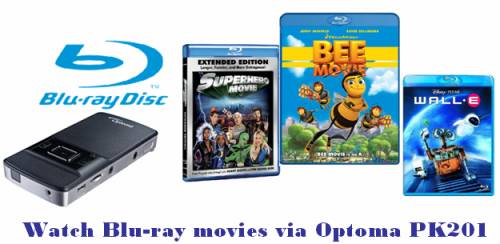
HomeOptoma PK201 mini projector is considered as an ideal home cinema projector for its usage of watching movies and displaying photos using the internal media player. Optoma PK201 features a micro SD card slot that supports expanding capacity up to 16 GB in size, which gives Optoma PK201 the ability to directly project pictures and videos on the PK201 from a camera or other source devices like Motorola Droid by simply switching a memory card. In the purpose of helping Optoma PK201 mini projector owners experience their beloved Blu-ray movies on the gadget, this tutorial aims to show you how to rip Blu-ray movies to Optoma PK201 mini projector with Pavtube Blu-ray Ripper.
Step-by-step instruction:
How to rip Blu-ray movies to Optoma PK201 mini projector?
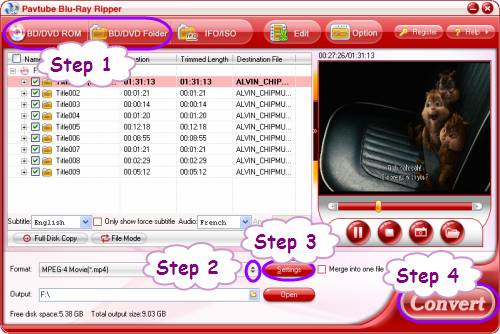
Step 1: Run Pavtube Blu-Ray Ripper, and load Blu-ray movie files to it
You can load BD files into the application through “BD/DVD ROM”, or “BD/DVD Folder”.
Step 2: Select output format for Optoma PK201 mini projector
To rip Blu-ray movies to Optoma PK201 mini projector, it is necessary to know the video formats supported by Optoma PK201, they are AVI, MOV, MP4 and 3GP. That means you need rip Blu-ray to a format among the four to satisfy Optoma PK201 mini. Take MP4 for example, follow “Common Video”> “MPEG-4 Movie (*.mp4)” would be all right.
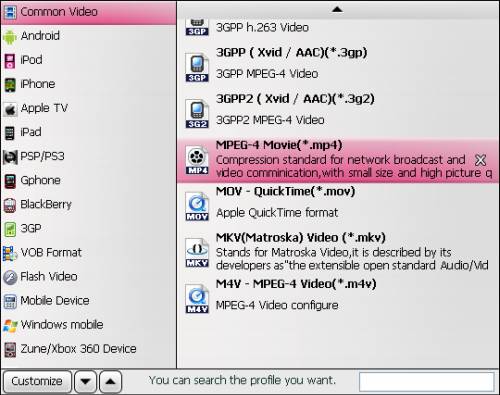
Supposing you would like to use the Optoma PK201 as an iPod or iPhone display, you can then choose “iPod” or “iPhone” preset.
Step 3: Click “Settings” button to do advanced settings
Click “Settings” button, then you will be able to adjust audio and video parameters to have good control of the output file quality. The adjustable settings include codec, aspect ratio, bit rate, frame rate, sample rate, and audio channel. An 800x600 resolution is recommended when convert Blu-ray movies to Optoma PK201 for better projection.
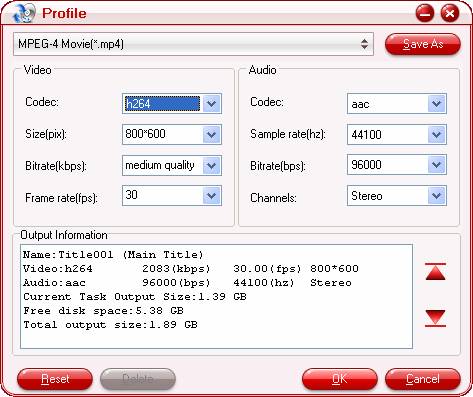
Step 4: Rip Blu-ray movies to Optoma PK201 mini projector
Click “Convert” button to start converting Blu-ray movies to Optoma PK201 mini projector. Pavtube Blu-Ray Ripper adopts advanced audio and video in sync technology, so it is able to guarantee you a perfect audio and video in sync output file quality. When the ripping task is finished, you can get the final files for your PK201 via clicking “Open” button with ease. Just copy the files to your micro SD card, and now you are ready to experience your Blu-ray movies in 16:9 widescreen. Have fun.
 Free Trial Blu-ray Ripper

Useful Tips
- How to convert blu-ray movies, DVDs and HD videos to Optoma PK301/201 Pico Projector video on Mac OS X?
- Customize blu-ray movies, DVDs for Samsung SP-H03 Pico Projector
- Play Blu-ray, DVD on Optoma PK201 and Optoma PK301
- Projecting blu-ray and DVD movies with Optoma PK301/ PK201 Pico Projector
- How to project blu-ray and DVD movies with AAXA P2 Pico Projector?
- How to customize Blu-ray Movies, DVDs and videos for AAXA P2 projection?




