

 Home
Home“Is there any way I can take a chapter from Blu-ray Disc and bring it into iMovie/Final Cut Express? My ultimate goal is to take some clips (without too much manipulation) and burn it onto my own personal DVD using iDVD…”
The answer is YES, and below is a complete solution. If you’d like to clip some frames or extract music from a favorite BD movie and feel like to make them into your own short film with iMovie/Final Cut Express, the following tools are essential:
1. Your Mac computer with iMovie or Final Cut Express
2. An external Blu-ray Disc Drive to read contents from BD
3. A Blu-ray ripper/converter app that exports video in iMovie/Final Cut Express formats, like Pavtube iMedia Converter for Mac.
Let’s see how to rip and import a Blu-ray clip to iMovie/FCE for editing.
1. Connect external BD drive with your Mac, and put in source Blu-ray Disc.
2. Get iMedia Converter for Mac, run the app and convert the Blu-ray movie to Apple Intermediate Codec, which is naturally supported by iMovie and Final Cut Express. Keep in mind that you need to keep Mac networked to get iMedia Converter work properly.
3. Load the converted .mov files (encoded with AIC) to iMovie/Final Cut Express for editing.
Find detailed steps for ripping/converting Blu-ray to Apple Intermediate Codec with iMedia Converter:
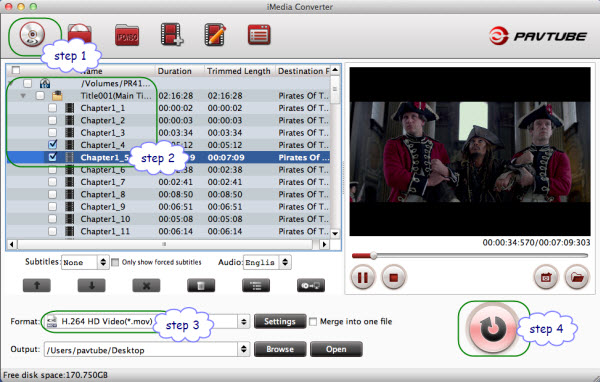
Step 1. Click “Load BD/DVD” and choose the BD drive to load Blu-ray movie directory.
Step 2. Unfold movie directory and uncheck all the other chapters you don’t want to keep. Just select the chapter(s) you need.
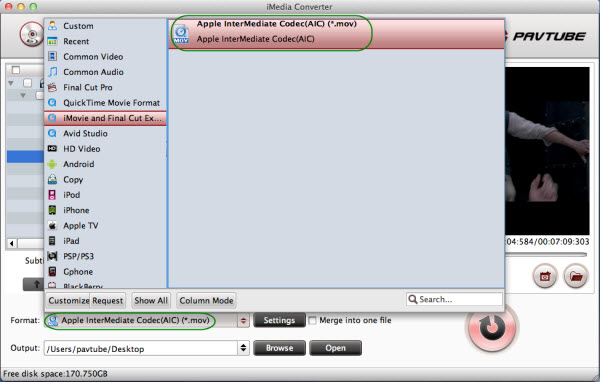
Step 3. Click on “Format” bar and choose “QuickTime Movie Format” > “Apple InterMediate Codec (AIC) (*.mov)”.
Step 4. Click on “Convert” button to start converting Blu-Ray to Apple Intermediate Codec.
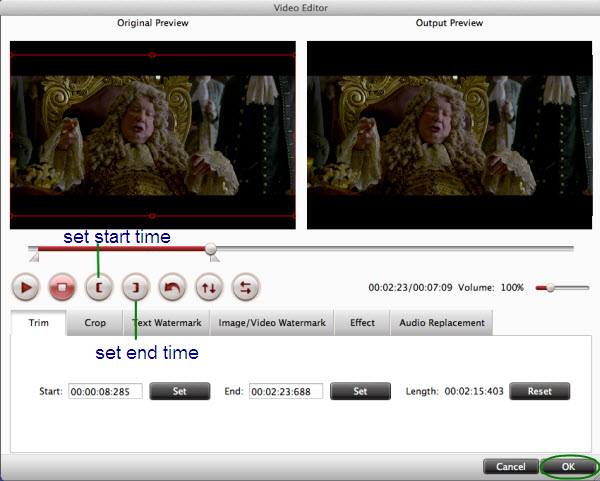
How to trim/clip specific length?
Select the movie and click on “Edit” menu to enter Editor, where you clip out movie by setting the start and end points for each segment.
What if I want to keep sound track only?
Follow “Common Audio” and select an audio format for conversion in Step 3, e.g. AAC, MP3, AIFF, format.
Is it possible to change video resolution to 720p, frame rate to 29.97?
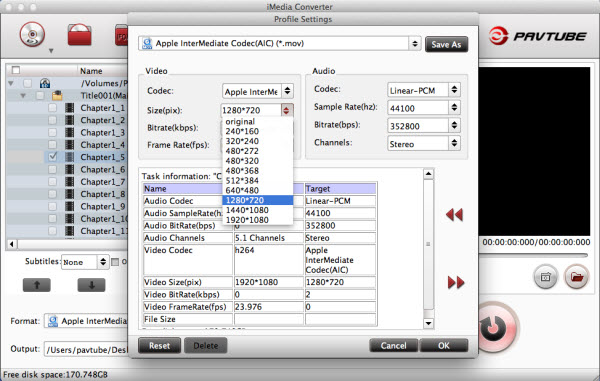
Yes. Simply click “Settings” and set video resolution, frame rate, bitrate to your liking. Both HD 1080p and SD 480p are available.
 Free Trial iMedia Converter for Mac

Useful Tips
- Make Sony HDR-SR1 MTS Editable in FCE
- Convert Canon/Panasonic P2 MXF to AIC MOV for FCE Editing
- Why can't Premiere Pro and Final Cut Express 4 import my AVCHD files?
- Sony SLT-A99 AVCHD MTS to iMovie/FCE
- Converting P2 MXF to Apple Intermediate Codec for FCE
- Convert MXF Recordings to FCE/iMovie-Mac MXF to iMovie AIC converter




