

 Home
Home
Comparing with the original 7.0 inch Samsung Galaxy Tab, Galaxy Tab 10.1 has a bigger screen than that of, and supports recording and playing video clips up to 1080p. These features make watching videos a great pleasure on Galaxy Tab. How’s Galaxy Tab perform for 1080p video playback? Follow this guide to get Blu-ray 1080p contents onto Galaxy Tab 10.1 and examine it by yourself.
Required app: Pavtube Blu-ray Ripper for Mac (Mac OS X 10.5 and above compatible, click to download a trial. Note that a trial puts watermark on created videos)
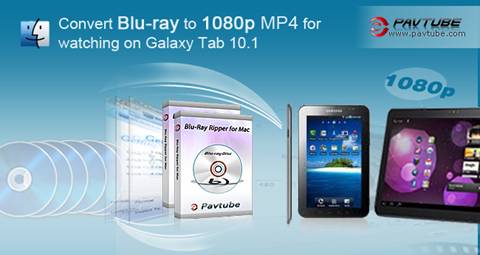
Guide: Convert Blu-ray to 1080p MP4 for watching on Galaxy Tab 10.1
Step 1: Click "BD/DVD Folder" or "IFO File" to load your Blu-ray or DVD files
Run Pavtube Blu-ray Ripper for Mac app on Mac computer, and click "BD/DVD Folder to load Blu-ray movie from external BD drive. The Pavtube Blu-ray Ripper for Mac can decrypt Blu-ray Discs and DVDs of all regions.
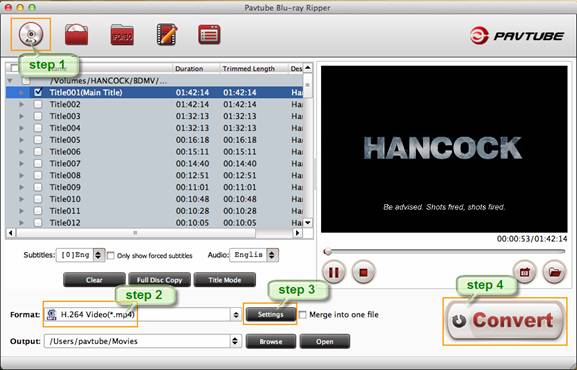
Step 2: Select Galaxy Tab 10.1 compatible format
Click the pull down menu at the opposite side of "Format", and then choose "Common Video" ->"H.264 Video (*.mp4)" format.
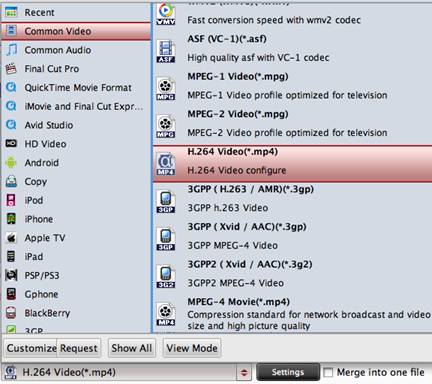
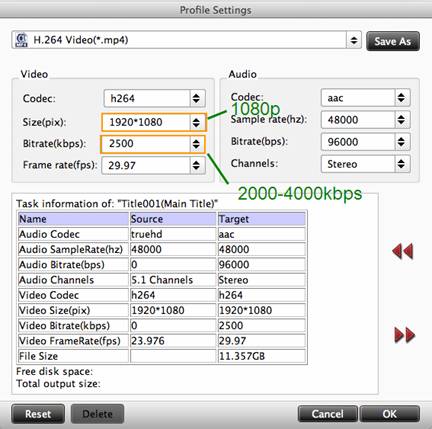
Step 3: Set 1080p video for Galaxy Tab 10.1 playback
Click on "Settings" button to adjust video and audio parameters. To rip Blu-ray to 1080p MP4 video, you may set video size to "1920*1080", and bitrate to 2000kbps or 3000kbps. Do not set bitrate higher than 4000kbps.
Step 4: Click "Convert" button to start ripping Blu-ray to Galaxy Tab 10.1.
As long as the ripping work is finished, you can click "Open" button to find generated 1080p videos on Mac. What you need to do next is just syncing movies to Galaxy Tab with Samsung Kies Mini and enjoying watching Blu-ray movies on Galaxy Tab!
Some tips on using Pavtube Blu-ray Ripper for Mac
- An external Blu-ray Disc dive is required to read Blu-rays.
- The software is also capable of ripping DVD to Galaxy Tab playable formats.
- With the exception of adding text as watermark, images, GIF animations, and videos can also be added as watermarks to realize the picture-in-picture effect.
 Free Trial Blu-ray Ripper for Mac

Useful Tips
- The complete Blu-ray/DVD Backup Solutions for Mac OS X
- Digitize Blu-ray movies to WD Mybook Live for playing through Roku
- Watch Blu-ray ISO movies on Apple's new iPhone 5C
- Rip and convert Blu-ray Avatar to MKV, MP4, MOV, etc. on Mac
- How do I Back up and Burn a Blu-ray with Mac?
- How to convert Blu-ray to Apple TV with 5.1 surround sound on Mac?




