

 Home
HomeWhen talking about HD media player, you must think of the WD TV Live Plus, Popcorn Hour or Apple TV, but have you heard of LaCinema Classic HD? The LaCinema Classic HD is a perfect HD multimedia hard drive player which combines Full HD 1080p playback with excellent format compatibility and DLNA media server functionality. It supports to play almost all the video formats, but Blu-ray is not included. The reason is simple. Blu-ray movies can only be played in special Blu-ray players.
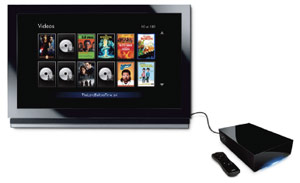
So, does it mean that you can not enjoy Blu-ray movies on LaCinema Classic HD? No, you can rip Blu-ray to LaCinema Classic HD for enjoying. What you need to convert Blu-ray to LaCinema Classic HD compatible video: Pavtube Blu-ray Ripper – the best Blu-ray to LaCinema Classic HD ripper.
With Pavtube Blu-ray to LaCinema Classic HD ripper, you can easily rip Blu-ray to LaCinema Classic HD with high video quality for playing. So, Pavtube Blu-ray Ripper is also called LaCinema Classic HD Blu-ray video converter.
Guide: Convert Blu-ray to LaCinema Classic HD without quality loss
To be prepared: Download a trial of Pavtube Blu-ray Ripper. If your computer hasn’t Blu-ray drive, you’ll need to connect an external Blu-ray drive before conversion.
Step 1: Run Pavtube LaCinema Classic HD Blu-ray video converter, and click “Load Disc” button to import Blu-ray movie files from copy-protected Blu-ray Disc.
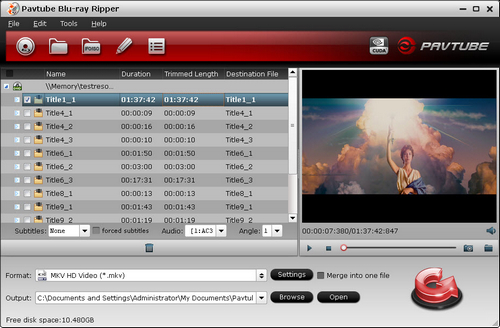
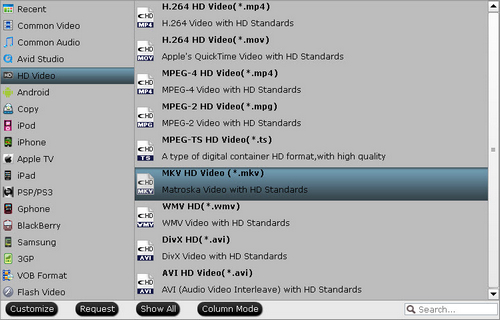
Step 2: Click the format bar under the file list, then you will find many output formats for you to choose from. Here you are recommended to choose HD Video >> MKV HD Video (*.mkv).
Step 3: Click the convert button to start to convert Blu-ray to LaCinema Classic HD MKV video. After the conversion, you get click the open button to get the converted MKV videos on your hard drive of PC.
Last Step: Play 1080p MKV on HDTV with Lacie Classic HD
Play ripped Blu-ray movie on your HDTV in two easy steps: connect the 2TB hard drive of LaCinema Classic HD to your computer to easily store your movies, and then connect LaCinema Classic HD to your TV for instant playback. You'll be able to store and enjoy your 1080p MKV and many more file types on any TV. As lossless Blu-ray conversion takes up more than 4TB, you’re advised to use NTFS file system to store ripped 1080p MKV into external HDD.
 Free Trial Blu-ray Ripper

Useful Tips
- How to Play AVCHD Video on Dune HD Player?
- Blu-ray experience with Xtreamer Ultra-1080p HD video
- Windows 8 Video Playback Tips: How to Play Back Movies & Music Discussion
- Streaming Videos from Windows 7 PC to DLNA compliant HDTV
- What is HDCP and how to fix HDCP compatibility issues?
- Experience 1080p Blu-ray with Netgear NeoTV 550 HD Media Player




