

 Home
Home
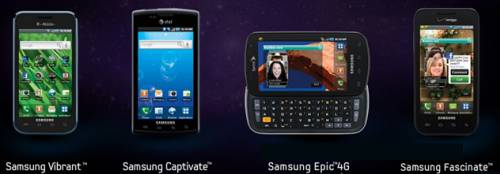
The Samsung Galaxy S series Android phones are called the Samsung Fascinate on Verizon, Samsung Captivate on AT&T, Samsung Vibrant on T-Mobile, and Samsung Epic 4G on Sprint. All of them feature a 4-inch 480 x 800 pixels big, beautiful screen and large storage capacity. Take Samsung Vibrant Android Phone for example, it has a 16 GB internal memory with microSD slot up to 32GB capacity expansion (2 GB included microSD memory card, or optional 32 GB microSD card). All that and more make Samsung Galaxy S phones the fantastic devices to experience videos and movies on the go. But what is the best way for you to convert Blu-rays, DVDs, and different videos to Samsung Galaxy S for playback? In this guide, we show you how to convert Blu-rays, DVDs, and different videos to Samsung Galaxy S phones, including Samsung Vibrant, Captivate, Epic 4G, and Fascinate for entertainment in detailed steps.
Requirements:
1. Installed copy of Pavtube Blu-Ray Video Converter Ultimate
2. Blu-rays, DVDs or whatever video sources you wanna convert to Samsung Galaxy S phones
3. Samsung Vibrant, Captivate, Epic 4G, or Fascinate with microUSB cable
Step-by-step guide:
How to convert Blu-rays, DVDs, and different videos to Samsung Galaxy S phones, including Samsung Vibrant, Captivate, Epic 4G, and Fascinate?
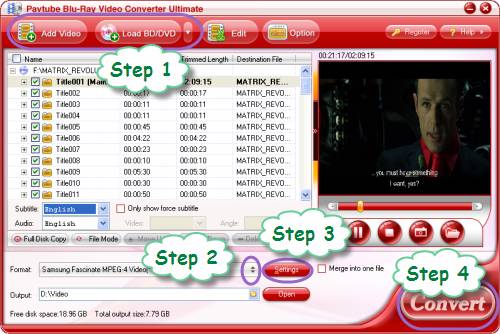
Step 1: Launch Pavtube Blu-Ray Video Converter Ultimate to add your video source
To convert video to Samsung Captivate, you can click “Add Video” to load video source. To rip Blu-ray and DVD to Samsung Vibrant, you can click “Load BD/DVD” to load your Blu-ray or DVD movie files.
Step 2: Select output format for Samsung Galaxy S
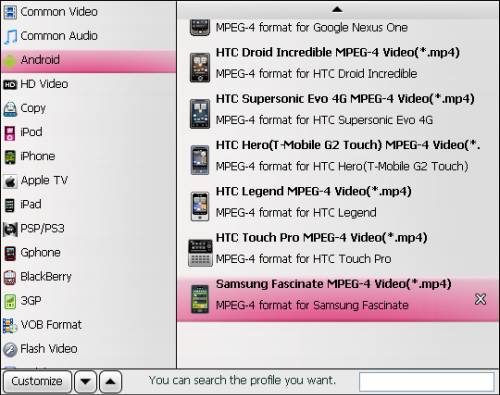
Click on the dropdown list of “Format”, and then follow “Android”> “Samsung Fascinate MPEG-4 Video (*.mp4)”. This format is specially optimized for Samsung Fascinate, but it can also deliver a well playback quality on Samsung Vibrant, Samsung Captivate, and Samsung Epic 4G.
Step 3: Adjust video and audio parameters
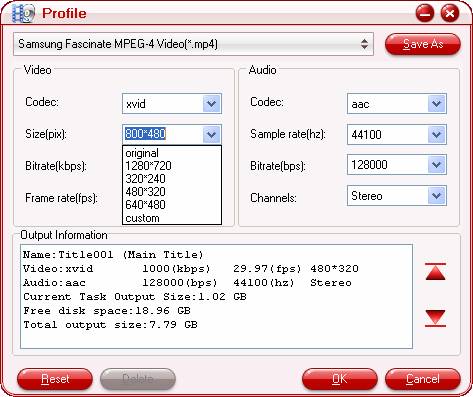
No matter you wanna convert Blu-rays, DVDs, and different videos to Samsung Galaxy S, or rip Blu-ray and DVD to Samsung Vibrant, or convert video to Samsung Captivate, you are allowed to click “Settings” button to optimized the output file quality by adjusting video and audio parameters. The codec, aspect ratio, bit rate, frame rate, sample rate, and audio channel are all adjustable in the following interface.
Tips:
If your source is larger than 800x480, you must set the aspect ratio to a maximum of 800x480.
Step 4: Convert Blu-rays, DVDs, and different videos to Samsung Galaxy S
When the above mentioned steps are done, you can click “Convert” button to start converting Blu-rays, DVDs, or different videos to Samsung Galaxy S phones, including Samsung Vibrant, Samsung Captivate, Samsung Epic 4G, and Samsung Fascinate. Once the conversion is completed, you can mount your Galaxy S on to your computer via USB, and create a folder named “Video” in the root folder on the Galaxy S. Then click “Open” button of Pavtube Blu-Ray Video Converter Ultimate to get the converted files, and copy them into the “Video” folder for your Samsung Galaxy S Android phone for entertainment.
See How to watch videos, music, DVDs and blu-ray movies on Samsung Galaxy Fascinate in style?
 Free Trial Video Converter Ultimate

Useful Tips
- Convert/Transfer Videos to Samsung Galaxy Tab for Playback
- Samsung Galaxy Note 3 Review, Specs, and Video Playback Tips
- Transfer files from internal memory to SD card for Samsung Galaxy Note II
- Three ways to transfer videos/movies from PC/computer to Samsung Galaxy S3
- Download 1080p/720p MKV movies to Galaxy S4
- How to play Videos, Music and Movies on your Galaxy S3?




