Home
HomeIn this part you will find overview, key features, and system requirements, as well as installation, registration, and user interface and menu instructions of Pavtube Blu-ray Ripper.
What is Pavtube Blu-ray Ripper?
Install, Register, & Uninstall Pavtube Blu-ray Ripper
User Interface
What is Pavtube Blu-ray Ripper?
Pavtube Blu-ray Ripper is an all-in-one Blu-ray & DVD copy and converter tool for Windows OS. It can read Blu-ray and DVD movies from disc, folder, and image file, and converts them into a wide variety of video formats to fit for your different uses. You can create video files from Blu-ray and DVD for use in your Home Theater System, Tablets, smartphones, media players, and video editing software. Plus, it supports copy the entire disc (1:1) to the hard drive of your PC with Blu-ray and DVD's original structures without any quality loss.
The best Blu-ray Ripper is capable of reading all subtitles and audio tracks in a Blu-ray/DVD movie, including Dolby TureHD Audio and DTS-HD Master Audio, which enables you to select whatever subtitles and audio tracks in the source movie as you like, no matter your mother tongue or other foreign languages.
Key features:
- Supports 3D Blu-ray, 2D Blu-ray and standard DVDs
- Copies Blu-ray Disc to BDMV folder or .m2ts clips without trans-coding
- Copies DVD to VIDEO_TS folder or .vob clips without trans-coding
- Converts Blu-ray/DVD movie to HD MKV/AVI/MP4/WMV/MOV/TS video
- Comes with presets for iPad, iPhone, Apple TV, PS3, Xbox 360, Android tablets/smartphones, and more
- Extracts MP3/AAC/AC3 audio from Blu-ray Disc/DVD movies
- Exports up to 1080p HD video and Dolby Digital 5.1/AAC 5.1 audio
- Keeps audio and subtitles stream in desired language
- Includes bonus features like split, trim, merge, crop, watermark, audio replace, de-interlace, auto shut down, etc.
- Supports GPU acceleration by taking advantage of the NVIDIA CUDA technology and AMD APP technology
Note: To use GPU computing feature, a CUDA-compatible NVIDIA graphics card or an AMD graphics card with AMD APP technology must be installed. The CUDA and AMD APP acceleration both work only when creating H.264 encoded video files.
Install, Register, & Uninstall Pavtube Blu-ray Ripper
System Requirements
- Operating System: Windows XP/2003/Vista/Windows 7/Windows 8
- DirectX Version: 9.0 or above
- Memory: 64MB at least
- Processor: 500MHz Intel or 500MHz AMD CPU
- Hard Disc Space: 512MB or above
- Optical Drive: DVD drive (Blu-ray drive is required for ripping Blu-ray disc)
Install& Uninstall
To install Pavtube Blu-ray Ripper, please
1. Download Pavtube Blu-ray Ripper setup or install file.
2. Double click on the setup file to begin installation.
3. Follow the instructions to install Pavtube Blu-ray Ripper on your PC.
To remove Pavtube Blu-ray Ripper from your computer, please
- Hit Windows Start and go through the following options: All Programs -> Pavtube -> Blu-ray Ripper -> uninstall Pavtube Blu-ray Ripper.
- From Windows Start menu, select to open “Windows Control Panel”. Double click “Add or Remove Program”, scroll to “Pavtube Blu-ray Ripper”, and click Remove.
(More details are provided at How to install and register Pavtube software)
Registration
Please note that you can’t directly register the software from trial version. You need to purchase the retail version, activate Pavtube Member Zone account, and login to get the download link and registration code for retail version. If you didn’t get the activation email, please contact our technical support via dvdwinsupport@pavtube.com for help.
User interface
Pavtube Blu-ray Ripper is a very easy-to-use converter tool. You can get what you want within just a few clicks on the interface.
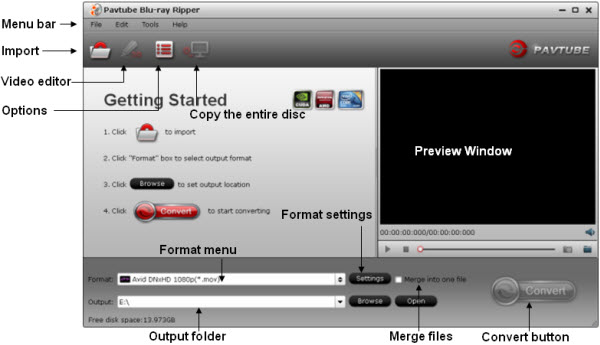
Menu bar
There are four menus in menu bar, namely “File”, “Edit”, “Tools” and “Help”.
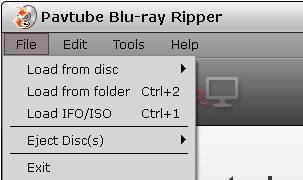
File menu: Contain operations like load from disc, load from folder, load IFO/ISO, Eject Disc(s), and Exit the program.
Edit menu: Edit selected task.
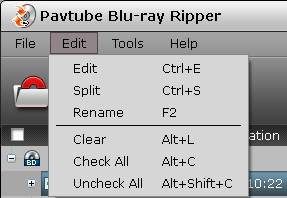
Edit: You can launch Editor by choosing this option. The Editor can also be launched by clicking the Editing button  on main interface.
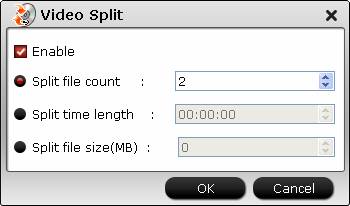
Split: Click to launch Split Window. This helps split the selected file by number, size, or duration. It can also be launched by clicking Split button .
.
Rename: Click to rename the output file for the selected file.
Tools menu: On this menu, you can change language and skin, customize format list, or launch Options window.
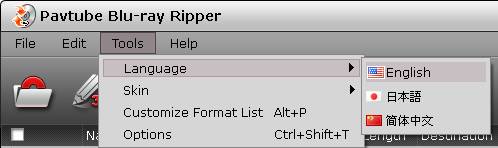
Language: You can choose from English, Japanese, and Simple Chinese.
Skin: Currently, there’s only one skin.
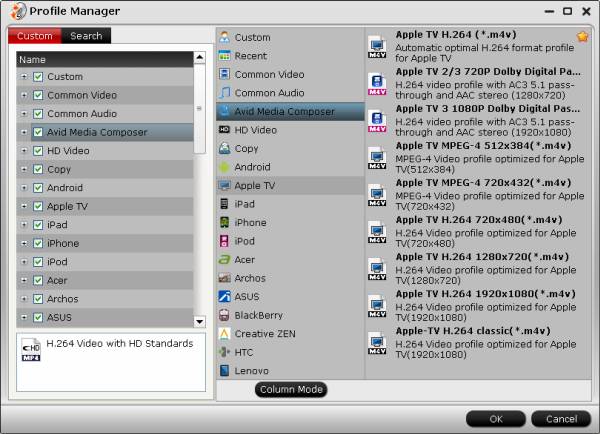
Customize Format List: You can launch Profile Manager and choose which output format to show in your format list. By default, all output formats will show in format list. This manager can also be launched by clicking Customize button at the bottom of Format list.
As shown in image below, by checking specific categories on the left column, you can choose which categories or output formats to show on format list.
Options: Choosing Options, you can launch Options window. It can also be launched by clicking Options button
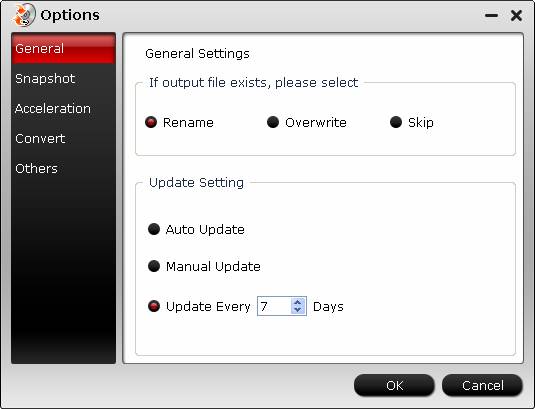
In General tab, you can choose what to do if the output file name already exists and set update frequency.
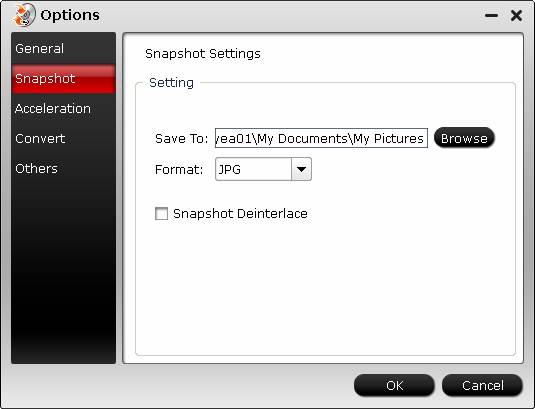
In Snapshot tab, you can set the output folder to save the pictures and the format of the pictures. You can choose from JPG, PNG, TIFF, and BMP. And you can deinterlace the snapshot.
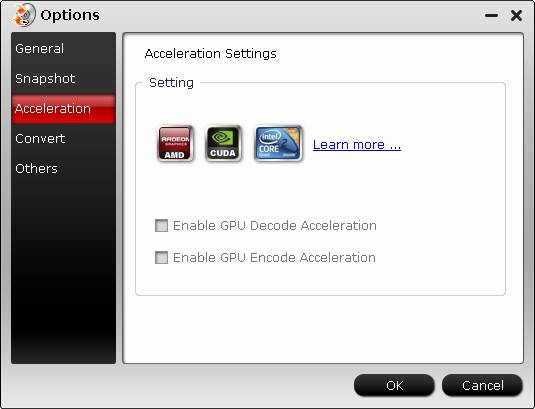
Under Acceleration tab, you can choose to enable GPU Decode or Encode Acceleration if your computer supports.
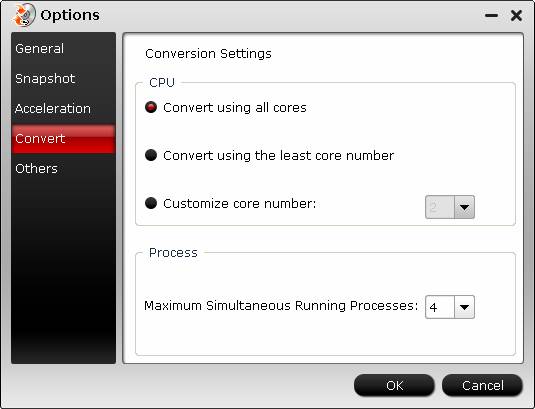
In Convert tab, you can set how many cores to use and how many tasks to process while converting.
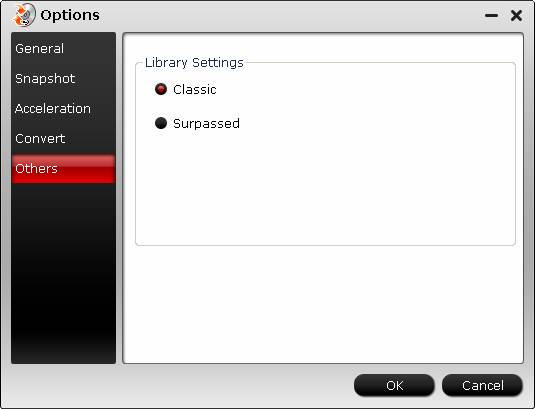
In Others tab, you can choose to use Classic or Surpassed Library for encoding and decoding. If you have conversion problems, you can change the Library and test again before contact technical support.
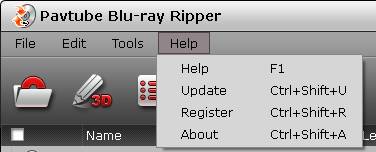
Help Menu: On this menu, you can find the online user manual, check update, launch register window with purchase link (if you are using a trial version), and find version number and other information about this program.
Copy the entire disc
By using Copy the entire disc  feature, you can preserve the Blu-ray/DVD’s original file structure without changing anything.