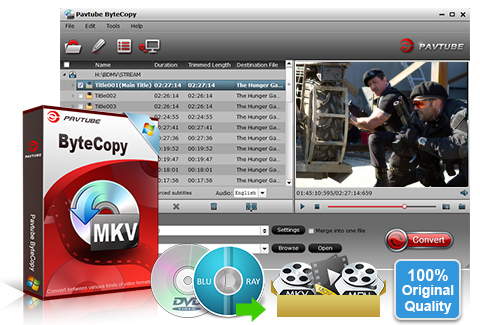
Pavtube ByteCopy is your best tool to rip and convert Blu-ray movies and DVDs to MKV container format with multiple audio tracks and subtitles included. Besides retaining multiple audio tracks (especially HD audios- Dolby TrueHD 7.1/5.1, DTS-HD Master Audio 7.1/5.1, Dolby Digital 5.1) and multiple subtitles in an MKV video without transcoding, Pavtube ByteCopy is also able to encode the original soundtracks into DTS 5.1 channels, AC3 5.1 channels, AAC 6 channels, PCM 6 channels, etc.with your wanted languages. It preserves chapter markers in the converted MKV file. All that and more make it possible for you to easily select your needed tracks, subtitles, as well as chapters when watching Blu-ray and DVD movies with your media players.
ByteCopy
- Backup BD/DVD to MKV with lossless quality. (Keep 1080p quality at 16:9 aspect ratio).
- Allow full preservation of all audio tracks, subtitles and chapter markers.
- Remove unwanted subs streams and audio tracks at will.
- Preserve soundtracks and subs in multiple languages, e.g. English, Spanish, French, Deutsch…
- Support exporting forced subtitles and .srt external subtitles.
Supported OS: Windows 2003/XP/Vista/Windows 7
Size: 47.0MB
ByteCopy Related Links:
-
Video Converter + BD/DVD Ripper
Blu-ray Video Converter UltimateYour complete Blu-ray/DVD/Video solution for home entertainment Blu-ray Ripper + DVD Ripper
Blu-ray RipperRipping Blu-ray and DVD movies to your wanted HD and SD file types
Overview
Rip BD/DVD to MKV from disc, folder and IFO/ISO image file
Pavtube ByteCopy not only can rip BDs directly from Blu-ray Disc and Blu-ray Folder, but also can convert DVDs from DVD disc, DVD Folder, DVD IFO File, and DVD ISO Image File.
Preserve multiple audio tracks and subtitles
When converting Blu-ray/DVD to MKV container format, you are free to select all of your needed tracks and subs to be preserved in the output MKV file.
Keep the chapter structure in a converted movie title
Pavtube ByteCopy enables users to preserve chapter markers when ripping Blu-ray/DVD to MKV, so you may select your wanted chapter to play with your media players.
Lossless output
Once you choosing "lossless" as output format, Pavtube ByteCopy will directly package Blu-ray or DVD movies into MKV container format without any quality loss.
Select subtitles/audio tracks for more than one file at a time
Pavtube ByteCopy makes it possible for you to select subtitles/audios for more than one file (title) at a time.
Non-burnt subtitles
Pavtube ByteCopy stores subtitles in the MKV file format without burning them to the video, so you can switch subtitle languages at will during viewing.
Keep forced subtitles and export .srt subtitles
The recently updated ByteCopy allows users to preserve the forced subtitles in a Blu-ray/DVD movie into the MKV output, and it also features option to help users export their required subtitles as .srt external subs to do other use.
Encode audio tracks with specified codec
Pavtube ByteCopy enables users to encode the source soundtracks in Blu-ray/DVD movies to your desired audio types, including DTS 5.1 channels, AC3 5.1 channels, AAC 6 channels, and PCM 6 channels.
Offer optimized presets for different HD Media Players
Pavtube ByteCopy offers optimized options for almost all popular HD media players, like WD TV Live, WD TV Live Plus, WD TV Live Hub, Popcorn Hour C-200, Popcorn Hour A-200, Popcorn Hour A-210, Seagate FreeAgent Theater +, Netgear NeoTV, LaCinema Classic HD, TViX Slim S1, ViewSonic VMP7, Xtreamer Pro, FANTEC P2700 HDD Media Player, Dune BD Prime 3.0 and more.
Produce MKV files for PC Media Players
The MKV files generated by Pavtube ByteCopy are playable with a number of free PC players, including VLC media player, Windows Media Player, Windows Media Center, MPlayer, etc. And the audio tracks, subtitles streams, and chapters preserved in the MKV container are available to select at will during playback.
Set Preferences
Select your preferred languages as usually-used audio tracks and subtitles, e.g. English, Spanish, French, Deutsch, Portugues, Norsk, Japanese, Chinese, etc.
CUDA Acceleration
NVIDIA CUDA acceleration is supported by Pavtube ByteCopy. The CUDA decoder is applied by default in the availability of a CUDA ready NVIDIA graphics card while using h.264 codec to encode MKV files.
Inlaid Preview Window
A preview window is inlaid for you to view the source video (image only, audios and subtitles are not available when previewing).
Shut down computer after conversion
Pavtube ByteCopy keeps you free from waiting around by ticking off the checkbox "Shut down computer after conversion" when processing Blu-ray/DVD encoding.
Input |
Blu-ray Discs, Blu-ray Folder, DVDs, DVD Folder, DVD IFO File,DVD ISO Image File Note: |
Output |
MKV container format with multi-audio tracks/subs streams/chapter info, including: Lossless output/HD Player output/720P output/576P output/480P output/ HD Player 720P output/HD Player 576P output/HD Player 480P output Encode file with different codecs, including Video codec: h264, xvid, mpeg2video, wmv1, wmv2, wmv3, wvc1 Audio codec: ac3, aac, mp3, mp2, dts, pcm_s16e, pcm_s24e, pcm_s32e Subtitles codec: dvdsub HD Media Player Compatibility: WD TV Live, WD TV Live Plus, WD TV Live Hub, Popcorn Hour C-200, Popcorn Hour A-200, Popcorn Hour A-210, Seagate FreeAgent Theater +, Netgear NeoTV, LaCinema Classic HD, TViX Slim S1, ViewSonic VMP7, Xtreamer Pro, FANTEC P2700 HDD Media Player, Dune BD Prime 3.0 and more. PC Player Compatibility: VLC media player, MPlayer, Windows Media Player, Windows Media Center, and more. |
| Brain |
Thanks to CUDAAfter using the cuda code, i went from 6,5 hours to 1,5 hours of making the same mkv. Thats 4,3 times faster than before. So saying that its 3 times faster with cuda i so true. So i only needed the videocard and not a whole new system , thanks to CUDA. Jan 4, 2012 |
| Wayne |
I enjoy using the programAll the other programs I used where either very slow, didn't take the movie off in lossless quality or couldn't get the information off the disc. ByteCopy always gets the movie off the disc in lossless quality with no hassles. I also get to choose the subtitles and the audio channels and I get all the chapters as well which I love. It does exactly what I want it to do and it does it efficiently and effortlessly. Overall I enjoy the functionality, simplicity and the efficiency of ByteCopy. I enjoy using the program.June 2, 2011 |
| James |
Good at preserving chaptersPavtube ByteCopy seemed to be good at preserving chapters. Picture quality and sound quality was great. I didn't notice any picture/audio sync problems which I did when using other methods. May 26, 2011 |
| Adolfo |
Handles subtitles wellI tried a lot of SW, but no one handles subtitles as well as Bytecopy processes. I'll certainly recommend to everyone BytecCopy because it is really complete. What interests me above all is to reduce the size of a mkv file, and to be honest with you, I have tried many programs and those that are closer to Bytecopy are "VidCoder" and "XMedia Recode".The first uses the excellent Codec "Handbrake" (why do not you also implement in Bytecopy?) but does not handle subtitles of BD.The second one is complete, with a good codec, but too complicated.I also tried commercial programs like the famous DVDFab, but it even goes in "crash" when trying to reduce the size of a mkv file (generated with "MakeMKV"). With other mkv files generated with other SW, DVDFab is OK but it can handle only one language and does not see the subtitles. Apr. 14, 2011 |
| Peterson, John M |
Works wonderfullyThe product works wonderfully, not one hiccup so far, have ripped 10 blurays and over 30 dvds to my pc media server. Mar. 24, 2011 |
| Rupert Heesom |
CUDA technology was my reason for buying the softwareI am happy with the software, although I still have to use the software on a gpu to speed it up. ByteCopy’s CUDA technology was my reason for buying the software. Mar. 23, 2011 |
| Quan |
Successfully convert VC-1 m2ts to H264 without any audio track delayI have just purchased your Bytecopy for VC-1 converting to H264. Well, I was trying to backup my CSI Season 1 Blu-ray to an external hard drive. It was done pretty well, which successfully convert VC-1 m2ts to H264 without any audio track delay. That video format is interlaced, so I switched up "Deinterlacing" in Preference and it did amazingly well! Mar. 15, 2011 |
| Scott |
Nice as it has CUDA SupportByteCopy is a nice little ripper program, I got it mainly for quick rips. Nice as it has CUDA Support. It works fine and is a very good program for the novice user. Mar. 10, 2011 |
| Preugpaibul |
Put many audios and many subtitlesI just use the ByteCopy on almost 10 blu-ray discs and several dvd-9 discs. It extremely fast on my Athlon PhenomII 3.4Ghz+8GBRam and Gigabyte GTX460. The results are exceptional far more than expected. What I really like is the ByteCopy can put many audios and many subtitles just like the real Blu-ray discs. This capability alone can sell especially for foreigners like myself. I'd like to listen to English and read English subtitle to learn English while sometimes I'd like to switch to my mother-tongue language if I don't understand the story. Feb. 23, 2011 |
| Ynoybe1 |
Nice productI bought the full version after testing out the trial. Nice product. I will test it much more extensively now that I have the full version. I have a CUDA enabled video card (GTX 460). I wish the conversion rate was faster. It's not bad at about 1.7 the length of the movie (h.264 @ 8000kbps), but the benchmark is definitely 1:1 or less than the run time of the movie. Considering the GTX460 is an extremely powerful processor, the conversion rate should be faster. I have tested a lot of blu-ray rippers and this one is the only one that offers to keep the HD audio. As long as this software keeps up with the copyright protections, I’ll be pretty happy. Thanks! Feb. 17, 2011 |
| Thomas |
Good compression and multi subsThanks to you guys. The bytecopy works great. good compression and multi subs. thums up Its the software i have been looking for.. so one's again.. THX. Jan. 27, 2011 |
| Wills |
Store more than one audio stream in the MKV containerI was able to store more than one audio stream in the MKV container and then choose during playback (I love to listen to the English sound track, but when my girlfriend watches we need to switch to French). Jan. 25, 2011 |
A: Please click here to see the detailed steps.
Q: I have ever purchased your Windows software and now I changed my PC to Mac.Can I install this software onto my Mac? Or can you send me a Mac version?
A: All of our softwares are platform-independent ones but not cross-platform.
So a Windows software cannot be installed onto a Mac computer and vice
versa.
If you need a Mac version, please kindly contact with Pavtube support
team at macsupport@pavtube.com.
Or if you need a Windows version, please
kindly contact with Pavtube support team at support@pavtube.com.
Discount
will be available for a second purchase.
A: a. The “Lossless” output format can be used 7 times only.b. When transcoding Blu-ray contents with “HD Player” or customized format, watermark will be put on the screen of generated videos..
A: Windows Media Center and Windows Media Player natively do not support MKV format files. To play back MKV file in WMC or WMP you need to install a MKV codec pack called Shark007 Codec Pack.
If you have Windows 7 system download the codec pack here.
If you have Windows Vista or XP system download the codec pack here.
Can you recommend me an external blu-ray drive for Mac or Windows?
A: Yes. We would like to recommend you several Mac or Windows compatible external blu-ray drives available from Amazon.
For Mac external blu-ray drive recommendation please see here.
For Windows external blu-ray drive recommendation please see here.
A: It depends on your source. When there are TrueHD and DTS-MA audio tracks in original Blu-ray files, you can keep them by choosing “Lossless” output format for conversion.
A: Select a Title and click the “Edit Title”, check the “Encode” box. Then set audio codec to AC3 or DTS, and audio channels to 6. In this way higher quality audio track will be converted to AC3 or DTS 5.1 audio.
A: Yes. You can set audio and subtitle languages that you always like to keep in Preference screen. Follow “Tools” menu-> “Preference”-> “Audio”/ “Subtitle” tab to set desired languages, and the software will remember you settings.
A: Yes. Each title and chapter is preserved in the way they are created into Blu-ray Disc/DVD when you using Pavtube ByteCopy.
A: Yes. CUDA encoding workflow is supported by Pavtube ByteCopy. And the CUDA decoder is applied by default in availability of a CUDA ready NVIDIA graphics card.
- How to remove audio tracks from Blu-ray and DVD movies?
- How to enjoy Blu-ray movies on HDTV with WD TV Live Plus HD Media Player?
- Rip Blu-ray Disc videos and make 1:1 backup of Blu-ray movie
- How to get Windows Media Center play MKV movie ripped from Blu-ray Disc?- For Windows 7 OS
- 1080p/1080i movie transcoding- Blu-ray VC-1 to H.264 MKV with Dolby TrueHD/DTS-HD Master Audio
- Backup/copy Blu-ray movie with lossless audio
- How to convert DVD to MKV with lossless quality?
- How to convert DVD to MKV DTS audio?
- Best Blu-ray to MKV software-rip/package Blu-ray ISO to H.264 MKV
- Blu-ray experience with Xtreamer Ultra- 1080p HD video and up to 7.1 audio out
- What you need for 1080p Blu-ray experience with Netgear NeoTV 550 HD Media Player
- Best solution for playing/watching Blu-ray Disc with HD media players
- Let LaCinema Classic HD play Blu-ray in 1080p MKV format
- Can any Blu-ray Ripper software copy ALL subtitle and audio tracks to an H264 MKV output file?
- How to stream DVD movie to DLNA compliant HDTV (DVD to TS with original video and audio)
- Playing Blu-ray with Popcorn Hour A-200 (BDMV/MKV/M2TS playback solutions)
1.6.3
Jan 15, 2012- Optimized the process of disc ejecting.
- Fixed some bugs.1.6.2
Dec 22, 2011- Added support to movies in Chinese file name.
- Fixed some bugs.1.6.1
Nov 22, 2011- Added AVI AC3 5.1 format for PS3 streaming.
- Added 16:9, 4:3 and 16:10 aspect ratio options to Crop feature.
- Fixed some bugs.v1.6
Oct 30, 2011- Added batch conversion facility.
- Fixed some bugs.v1.5
Aug 10, 2011- Fixed MKV rewinding failures.
- Simplified OCR fonts dictionary.v1.9
Jul 25, 2011- Introduced “Export HD Player” output option.
- Added Chinese language as optional user interface language.
- Now allows for exporting forced subtitles and .srt external subtitles.v1.4
Jun 20, 2011- Added support to latest Blu-ray.
- Updated to load Blu-ray ISO image (UDF 2.5 only) directly without assisting of virtual BD drive.v1.3
Apr 29, 2011Added support for BDAV Blu-ray discs.
- Added further support for PCM DVD audio streams when handling lossless BD/DVD to MKV backup.v1.2
Apr 12, 2011- Added support to latest Blu-ray.
- Now 30% - 40% faster when handling lossless BD/DVD to MKV backup.
- Added more MKV output options for users to compress Blu-ray movie (e.g. 720p, 480p).
- Added WVC-1 and WMV codecs for transcoding BD/DVD movies.v1.1
Mar 11, 2011- Auto de-interlace movie when encoding Blu-ray Disc/DVD.
- Prevent computer from entering sleep mode during conversion.
- Improved GUI experience, including simplified description and window resizing feature.
- Fixed incorrect aspect ratio issues for DVD transcoding.
- Optimized display of dvdsub and pgs subtitles.